AI Agents have become better at reasoning, planning, and executing tasks using various tools and performance improvements in the Large language models. But there’s one critical flaw that most developers overlook: Memory persistence.
Persistent memory solves this problem by enabling Agents to learn from user interactions and maintain continuity over time. This allows them to adapt to user preferences and deliver more personalized experiences, making them far more useful in real-world applications where context truly matters.
In this article, we’ll explore how to build a long-term memory chatbot using Mem0 AI and LangGraph. If you are new to LangGraph, you can check out our previous two articles on Getting started with LangGraph and building a Hybrid Search RAG using LangGraph.
Learning Objectives
- Why memory persistence is crucial for building practical AI applications that users want to use repeatedly
- Understand the difference between short-term memory and long-term persistent memory in AI workflows.
- How Mem0 compares to OpenAI’s native memory features and when to choose each approach
- The architecture and benefits of using Mem0 as a dedicated memory layer for your AI applications
- Implement Mem0 with LangGraph to create Agents that remember and learn from every interaction.
Why Do AI Agents Need Memory Persistence?
Most AI Agents today are like that brilliant friend who forgets you exist the moment you hang up. They can solve complex problems, write perfect code, and give amazing advice, but ask them the same question tomorrow, and they’ll act like they’re meeting you for the first time. This makes even the smartest Agents feel robotic because they never build on previous conversations or learn your preferences.
Persistent memory changes this completely. When an Agent remembers that you always prefer short answers over long explanations, or hate morning meetings. Instead of starting fresh every time, conversations become continuations. The Agent stops asking the same basic questions and starts anticipating your needs. That’s when AI stops feeling like a chatbot and starts feeling like a teammate who knows you.
What Is the Difference Between Short-Term and Long-Term Memory in AI?
AI Agents work with two common types of memory that imitate how humans think and remember: Short-term and Long-term memory.
Short-term memory is commonly also referred to as session or temporary memory. This memory primarily retains what’s relevant at the moment, such as your current request or the topic being discussed. Once the session ends, it’s gone. It’s useful for keeping track of immediate details, such as the question you asked a few seconds ago or the task you’re currently working on, but it doesn’t go beyond that moment. Most of the currently deployed LLM applications are usually session-based, which have a limited context window size.
Long-term memory, on the other hand, is where real personalization happens. It persists beyond a single session, storing useful details over time, like your work habits, preferred tools, or recurring goals. This allows an Agent to recognize patterns, remember past interactions, and adapt to your preferences.
How Does Mem0 Compare to OpenAI's Native Memory?
When it comes to adding memory to your AI applications, there are so many frameworks and libraries currently existing. OpenAI Memory – SOTA is the simple route, which is built right into their API, automatically extracts important stuff from conversations, and requires zero setup. But here’s the catch: you’re completely locked into their ecosystem, can’t control what gets stored or how, and it’s a black box. Recent benchmarks show OpenAI Memory scoring only 52.9% accuracy (LOCOMO benchmark) with shallow recall that often misses multi-hop details, which is important to store preference.
Mem0 takes the opposite approach as it’s a dedicated memory platform that works with any LLM provider and gives you full control over everything. You can customize how memories are stored, retrieved, and organized, plus it supports different embedding models and vector databases. The performance difference is significant: Mem0 achieves 66.9% accuracy while maintaining 1.4s latency and using only 2K tokens per query.
How does Mem0 help as a memory layer?
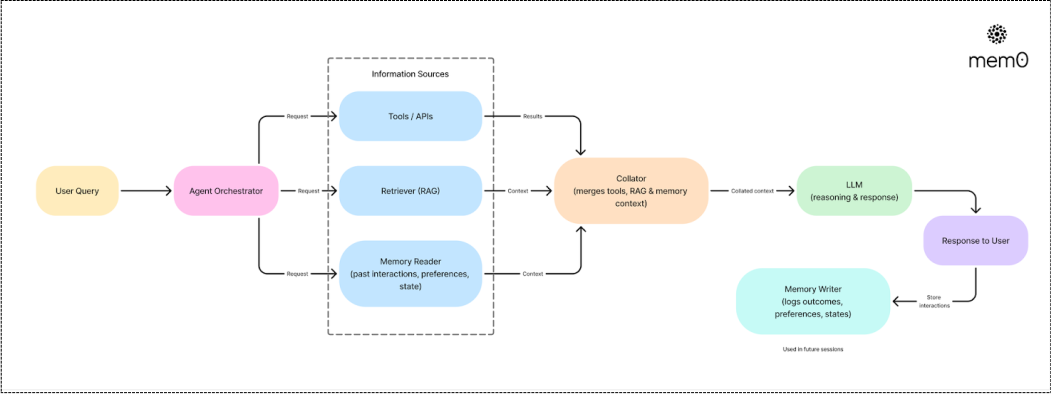
Mem0 functions as a dedicated memory infrastructure that sits between your application and AI models, transforming how Agents handle persistent information. Unlike traditional approaches where memory is either hardcoded or managed ad-hoc, Mem0 provides a systematic way to capture, store, and retrieve memories across all user interactions.
The platform automatically extracts relevant information via semantic and graph search from conversations and stores it in a structured format that makes future retrieval both fast and contextually relevant. When a user returns after days or weeks, Mem0 can instantly surface relevant memories that inform the Agent’s responses, creating continuity that feels natural and intelligent.
Step-by-Step tutorial to build a long-term memory chatbot using Mem0 and LangGraph
In our implementation will demonstrate how to set up Mem0 as the memory layer, integrate it with LangGraph’s state management for Agentic workflows, and create memory-aware workflows that persist across multiple conversations.
Step 1: Installation & Initial Setup
First, we’ll install the required packages for our memory-enabled Agent. LangGraph handles the Agent workflow while Mem0 provides the persistent memory layer that remembers everything across sessions. The LLM that we will use to generate the response in Gemini 2.5 flash.
Let’s import the required modules.
Step 2: Set up API keys
Next, we’ll configure the API keys for both Mem0 and Google’s Gemini model.
Step 3: Initialize Gemini LLM and Memory Client
Now we’ll set up the core components – Google’s Gemini model for generating responses and Mem0’s client for handling all memory operations.
Step 4: Build LangGraph State
We’ll create the state structure that LangGraph uses to pass information between different parts of our Agent workflow.
Step 5: Save and Retrieve Memory logic
We need two core functions to make our Agent remember things. One searches through past memories when answering questions, and another saves new conversations for future reference.
- Search finds relevant memories from past conversations using the user’s current query, filtering by user_id to keep memories private and personalized
- Add automatically saves both the user’s question and AI’s response into memory, extracting key insights that will be useful for future conversations
Filtering by user_id ensures each user only sees their own memories and maintains privacy.
Step 6: Define Chatbot node logic
Now that the search logic is defined, this will provide the context that will be passed as the prompt to the LLM. To make it more context aware, we are providing control to the LLM as a travel assistant that recommends places based on your past interactions.
The LLM takes retrieved memories and combines them with the current question to generate contextually aware responses
The main node, i.e., the chatbot function, orchestrates the entire process. It pulls relevant memories, generates responses using that context, and automatically saves new insights back to memory for future conversations.
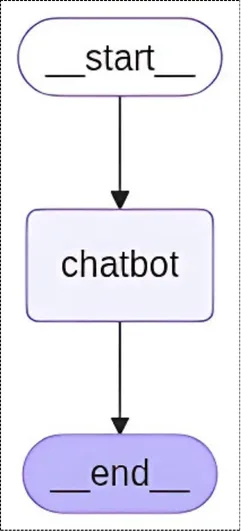
Step 7: Compile the StateGraph
Now we’ll wire everything together by creating the actual workflow graph that connects our chatbot function from start to finish.
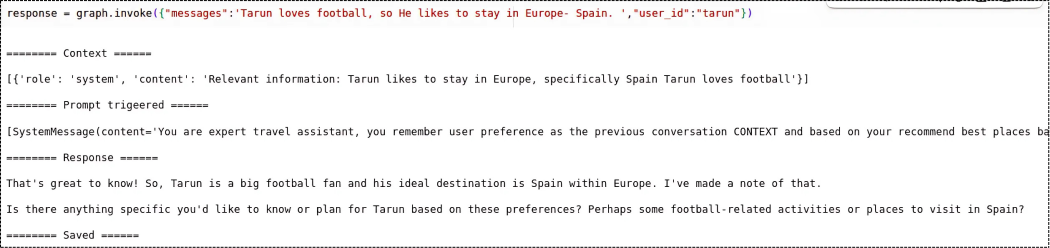
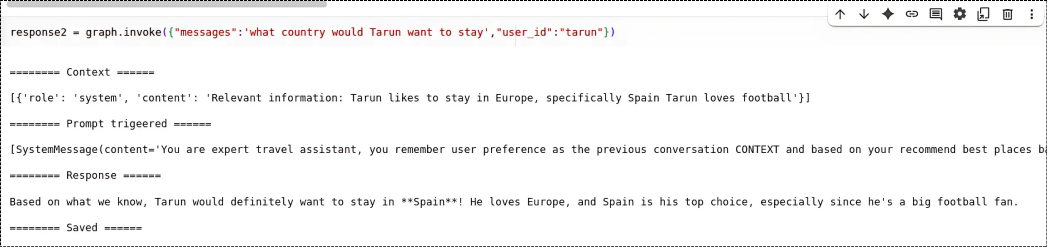
Step 8: Execute User Query
Now it’s time to test the application using the actual queries. Make sure to define a unique user_id.
Final Words
The key insight is that memory isn’t just about storing information but it’s about creating continuity and building intelligence over time. When Agents can learn from past interactions, understand user patterns, and provide increasingly personalized experiences, they become tools that users want to engage with repeatedly.
This is what Context engineering is all about. A system that collects the right context and provides it to the Agentic application. We will have a dedicated article on Context engineering, stay tuned.
FAQs
- What is Mem0 AI used for in chatbots?
Mem0 AI acts as a dedicated memory layer that helps chatbots remember user preferences and past interactions across sessions.
- How is Mem0 better than OpenAI’s native memory?
Mem0 offers higher accuracy, full customization, and works with any LLM provider, unlike OpenAI’s fixed and less transparent memory.
- Can I use Mem0 with any LLM or is it limited to Google or OpenAI?
Yes, Mem0 is model-agnostic and supports integration with any large language model of your choice.
- What is LangGraph’s role in this chatbot setup?
LangGraph manages the agent workflow and state transitions, enabling memory-aware responses in multi-step conversations.
- Is long-term memory really needed for all AI agents?
Yes, for agents that require personalization or continuity, long-term memory drastically improves user experience and task efficiency.