
Building Enterprise AI Infrastructure with On-Prem GPUs
A mid-size enterprise recently ran an internal audit of its AI workloads. The team found $3.2 million in wasted compute sitting across cloud GPU clusters. These machines were running, billing by the hour, and doing almost nothing useful. The AI product they were supposed to power had not even launched yet.
This story is not unusual. According to the 2025 State of AI Cost Management report, 80% of enterprises miss their AI infrastructure budgets by more than 25%. And 84% say AI workloads are eating into their gross margins. The cloud was supposed to simplify things. For many organizations, it has done the opposite.
On-premise GPU infrastructure means owning and operating dedicated GPU servers inside your own data center or colocation facility, rather than renting compute from cloud providers like AWS, Azure, or GCP.
This blog breaks down what it actually takes to build enterprise AI infrastructure on-prem, where cloud spending falls apart, and the decisions CTOs and CFOs need to make before writing the first purchase order. We will go beyond the usual hardware specs and cover the financial, compliance, and team readiness angles that most guides skip entirely.
The Cloud GPU Waste Problem Is Bigger Than You Think
Here is the surprising truth about cloud GPU spending: almost a third of it goes nowhere. Industry benchmarks show that baseline cloud waste across enterprises sits between 28% and 35% of total cloud spend. For GPU workloads, the problem gets worse. GPU instances cost 10 to 100 times more per hour than standard compute, which means a small inefficiency becomes a large dollar amount fast.
The Flexera 2025 State of the Cloud Report found that organizations exceed their cloud budgets by an average of 17%, with 32% of that excess flagged as pure waste. For a team spending $50,000 a month on GPUs, that translates to roughly $16,000 per month vanishing into idle silicon.
Why GPU Waste Hits Harder Than Regular Cloud Waste
What most people do not realize is that GPU waste is not just a cost problem. It is a culture problem. A 2025 HackerNoon analysis found that 44% of enterprises still manually assign workloads to GPUs. Teams spin up the largest available instance to avoid out-of-memory errors. They keep GPUs running during debugging sessions, through meetings, and overnight. Nobody shuts them down because nobody is watching.
Academic research backs this up. A study published through ACM analyzed 118,276 GPU jobs on the Perlmutter supercomputer (1,536 NVIDIA A100 nodes). The finding? 37% of GPU jobs never exceeded 15% memory utilization, and those jobs accounted for 37% of total node hours. In plain terms, more than a third of expensive GPU time was barely being used.
This is not just a technology gap. It is a training and upskilling gap. Teams that lack GPU optimization skills, CUDA proficiency, or kernel-level performance monitoring will waste compute regardless of whether they run on cloud or on-prem.
Struggling with GPU underutilization?
It starts with your team's skill set. Explore DataCouch's enterprise training programs to upskill your engineers in GPU optimization, CUDA, and AI infrastructure management.
The Hidden Fees That Inflate Your Cloud GPU Bill by 20 to 40%
Beyond idle instances, cloud GPU bills carry buried costs. Data egress charges, inter-region transfers, and premium networking can add 20% to 40% to your monthly total. Multiple FinOps studies confirm that idle or underused resources account for up to 32% of all cloud waste. When you add data movement costs on top of that, cloud GPU economics start looking very different from what the pricing page suggested.
The Real Cost of On-Prem GPU Infrastructure (It Is Not What You Think)
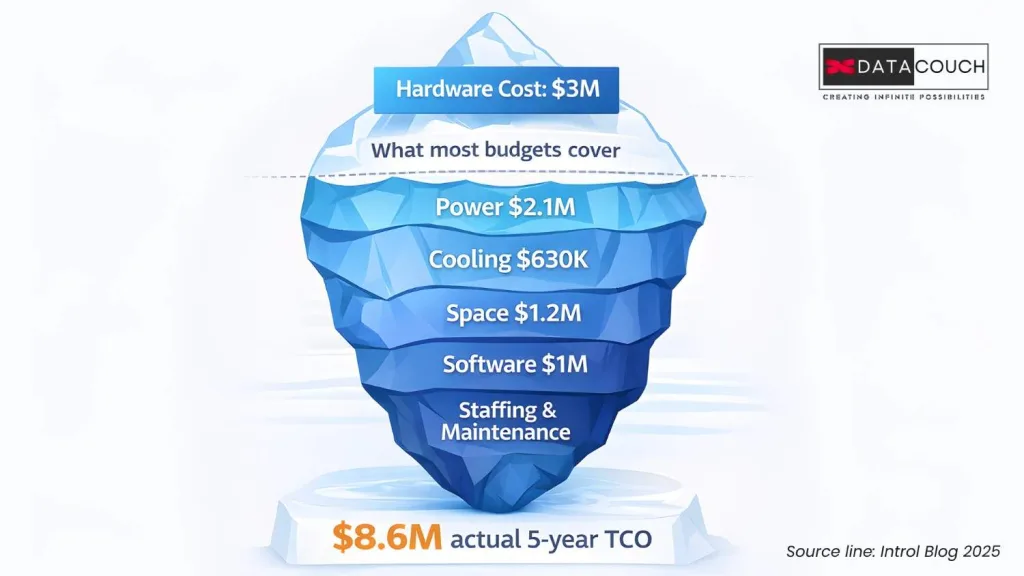
Let us get the uncomfortable number out of the way first. According to Introl’s 5-year TCO analysis, a $3 million investment in 100 NVIDIA H100 GPUs actually costs $8.6 million over five years. The hardware itself represents only about 35% of the total. Power, cooling, networking, staffing, software licenses, and maintenance make up the rest. Organizations that budget only for hardware face average cost overruns of 165% by year three.
Here is how the cost breaks down for a 100-GPU H100 cluster over five years:
| Cost Component | Annual Cost | % of 5-Year TCO |
|---|---|---|
| GPU Hardware (one-time) | $5.3M upfront | ~35% |
| Power (400kW, PUE 1.5) | $420,000/year | ~16% |
| Cooling | $126,000/year | ~5% |
| Data Center Space | $240,000/year | ~9% |
| Networking (10Gbps) | $120,000/year | ~5% |
| Software Licenses | $200,000/year | ~8% |
| Maintenance Contracts | $265,000/year | ~10% |
| Staffing (specialized) | Variable | ~12%+ |
The Breakeven Moment: When On-Prem Starts Saving You Money
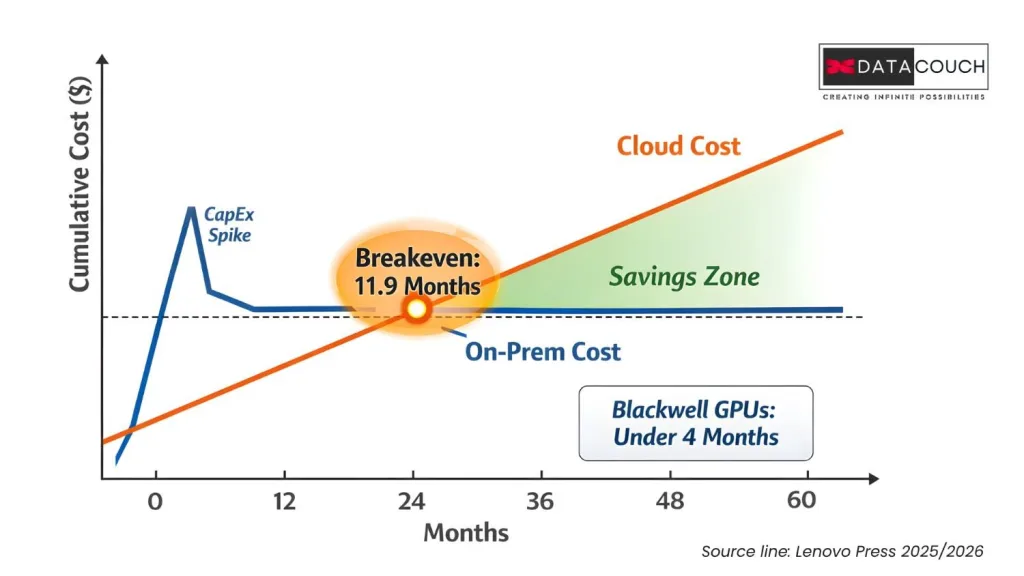
Despite the high upfront number, the math flips faster than most people expect. Lenovo’s 2025 TCO whitepaper calculated that an 8xH100 on-prem server breaks even against an equivalent AWS P5 cloud instance in approximately 11.9 months of continuous use. Their 2026 follow-up study showed that with newer Blackwell architecture GPUs at high utilization, breakeven drops to under four months.
The 2026 study also introduced something called the “Token Economics” framework. Instead of comparing cost per GPU hour, it compares cost per million tokens of AI inference output. The result? On-premise infrastructure delivers up to an 18x cost advantage over Model-as-a-Service APIs. That reframes the decision from “how much does hardware cost” to “how much does intelligence cost.”
The simple decision rule: if your GPU utilization will stay above 60 to 70% for workloads lasting more than 12 to 18 months, on-prem wins on cost. Below that, cloud or hybrid is the smarter bet.
Need help building the business case?
DataCouch's AI consulting team helps enterprises model TCO, plan hybrid architectures, and avoid the 165% budget overrun trap.
Building the Stack: What On-Prem AI Infrastructure Actually Requires
Buying GPUs is the easy part. Building the infrastructure around them is where most teams underestimate the effort. A production-ready on-prem AI environment needs five pillars working together.
- Compute: Current-generation options include NVIDIA H100/H200 (Hopper) and B200/B300 (Blackwell). An 8xH100 server runs $250,000 to $400,000. Vendors like Dell (PowerEdge XE series), HPE (Private Cloud AI), Lenovo (ThinkSystem), and Supermicro offer pre-integrated systems.
- Networking: NVIDIA recommends at least 100 Gbps with RDMA support for multi-node training. InfiniBand remains the standard. NVIDIA Quantum-2 switches run about $35,000 each.
- Storage: AI workloads need both speed and capacity. Plan for roughly 50TB of high-performance NVMe storage per GPU. A 100-GPU cluster typically requires about 5PB, costing around $600,000.
- Power: Enterprise GPU racks require 208 to 240V circuits with 30 to 60A capacity per rack. Each high-end GPU draws 700W to 1,200W.
- Cooling: This is the one most teams get wrong. More on that below.
The Cooling Problem Nobody Budgets For Properly
Air cooling is dead for serious AI deployments. Modern GPU racks run at 50 to 120+ kW, and a single 100kW rack consumes the same power as 80 American homes. Traditional air conditioning cannot keep up.
Liquid cooling is now mandatory for high-density GPU deployments. The data center liquid cooling market reached $5.5 billion in 2025 and is projected to hit $15.8 billion by 2030. Immersion cooling, where servers sit submerged in dielectric fluid, achieves a PUE (power usage effectiveness) as low as 1.02 to 1.03 and cuts CO2 emissions by up to 30%.
Here is the number that matters: liquid cooling adds roughly $500,000 in upfront costs, but it saves around $50,000 per year in energy AND enables two to three times the rack density. That means fewer racks, less floor space, and lower real estate costs. Over five years, the cooling investment more than pays for itself.
Your infrastructure team needs to be ready before the hardware arrives.
Explore DevOps and cloud infrastructure courses covering Kubernetes, Docker, CI/CD, and infrastructure-as-code for GPU environments.
Data Sovereignty: The Compliance Case for On-Prem That Is Getting Stronger
Cost is one side of the coin. Compliance is the other, and it is tightening globally.
India’s Digital Personal Data Protection Act (DPDPA) rules were notified in November 2025, covering 800 million internet users. The compliance deadline is May 13, 2027. The rules require 72-hour breach notification, annual audits for Significant Data Fiduciaries, and strict consent management. For Global Capability Centers processing Indian citizen data, on-prem gives the tightest control over data residency.
In Europe, the EU AI Act has added mandatory Data Protection Impact Assessments for high-risk AI systems. GDPR penalties reach up to 20 million euros or 4% of global turnover. And the US CLOUD Act means any data stored on a US-headquartered cloud provider is potentially accessible to US government requests, regardless of where the data physically sits.
For industries like healthcare (HIPAA), banking (RBI data localization in India, DORA in Europe), and defense, on-prem is often not a preference. It is the only compliant option for training AI models on sensitive data.
Building AI on sensitive data?
Your team needs security certifications. Check out DataCouch's AI-Driven IT and Security Operations training for enterprise compliance readiness.
GPU Depreciation: The Financial Risk Nobody Warns You About
Here is something most infrastructure blogs will not tell you: GPU depreciation is one of the most misunderstood variables in enterprise AI economics. NVIDIA now ships new GPU architectures on a roughly one-year cycle (Hopper to Blackwell to Rubin). Meanwhile, hyperscalers carry these chips on their books for five to six years.
Microsoft CEO Satya Nadella recently said: “I didn’t want to go get stuck with four or five years of depreciation on one generation.” That is a direct quote reported by CNBC in their November 2025 coverage of the GPU depreciation debate.
But the picture is not entirely bleak for buyers. GPUs hold value through what analysts call the “value cascade.” A chip that trains frontier models in years one and two gets repurposed for inference in years three and four, then shifts to batch processing or HPC workloads in years five and six. CoreWeave’s CEO told CNBC that a batch of H100s from 2022 were immediately rebooked at 95% of their original contract price when they became available. Azure retired V100 GPUs in September 2025, nearly 7.5 years after launch.
Practical advice: budget your depreciation at a two-year cycle, and benefit if the hardware lasts longer. Build a refresh strategy around three-year windows, not five. And keep an eye on the secondary GPU market. Resale and redeployment extend economic value well beyond what aggressive depreciation schedules suggest.
The Smart Approach: Hybrid Infrastructure That Eliminates Waste
The best enterprises do not go all-in on cloud or all-in on on-prem. They build a hybrid model matched to workload characteristics.
| Workload Type | Best Fit | Why |
|---|---|---|
| Sustained inference (production) | On-Prem | Predictable, high-utilization, cost-efficient |
| Burst training (large model fine-tuning) | Cloud | Variable demand, short duration |
| Experimentation and prototyping | Cloud spot instances | Low cost, interruption is acceptable |
| Sensitive/regulated data | On-Prem | Data sovereignty, compliance control |
| Edge AI deployment | On-Prem (Jetson/edge) | Latency, connectivity constraints |
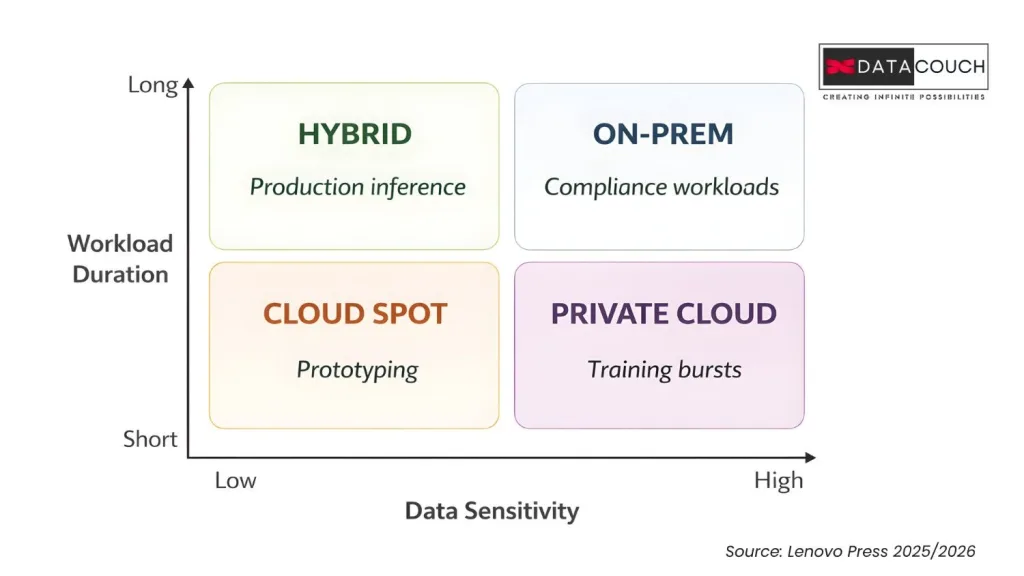
Tools like NVIDIA Run:ai (now available on Azure), HPE GreenLake, and Nutanix Enterprise AI make hybrid orchestration practical. They let teams allocate, share, and shift GPU resources between on-prem and cloud based on real-time demand.
Running workloads across cloud and on-prem?
Your team needs multi-cloud proficiency. Browse cloud training courses on AWS, Azure, and GCP to build that hybrid skill set.
Your GPUs Are Only as Good as Your Team
This is the angle that almost every competitor article ignores. You can buy the most advanced GPU cluster in the world, and it will still waste 37% of its capacity if your team does not have the right skills.
Remember that ACM research finding? Over a third of GPU jobs barely touch memory utilization. That is not a hardware problem. It is a training and certifications gap. Teams need proficiency in GPU cluster management, CUDA optimization, Kubernetes GPU orchestration, AI-specific FinOps, InfiniBand networking, and even liquid cooling operations.
The Stanford AI Index 2025 noted that inference costs have dropped from $20 to $0.07 per million tokens thanks to hardware and software improvements. But capturing those gains requires engineers who understand how to optimize the full stack, not just write model code.
Investing in upskilling programs before or alongside your hardware purchase is not optional. It is the difference between a GPU cluster that pays for itself and one that becomes the most expensive space heater in your data center.
Close the GPU skills gap before it costs you millions.
DataCouch's AI and ML training programs cover everything from Generative AI certifications to hands-on data engineering, built for enterprise teams.
Key Takeaways
- Cloud GPU waste is real and expensive. 28 to 35% of cloud spend is waste. For GPUs, idle time and overprovisioning push losses even higher.
- On-prem TCO is often misunderstood. Hardware is only 35% of the five-year cost. Budget for the full picture or face 165% overruns.
- Breakeven comes faster than expected. Under 12 months for H100 systems, under 4 months for Blackwell at high utilization.
- Compliance is pushing enterprises toward on-prem. India’s DPDPA (May 2027 deadline), the EU AI Act, and sector-specific regulations make data sovereignty a hard requirement.
- GPU depreciation is manageable. The value cascade model extends useful life to five to seven years. Budget conservatively and benefit from longer hardware life.
- Hybrid wins. Match workloads to the right infrastructure. Sustained inference on-prem, burst training in the cloud.
- Skills determine ROI. Without training in GPU optimization, your hardware investment delivers a fraction of its potential.
The question is not whether your organization should invest in on-prem AI infrastructure. It is whether your team, your budget planning, and your compliance strategy are ready for it. What is the one capability gap you would close first: the hardware, the skills, or the financial model?
Ready to make your AI infrastructure investment count?
Start with your people. Explore DataCouch's full course catalog or talk to our consulting team about building a GPU-ready workforce from day one.



