Top 5 AI Projects to Build While Studying for AI-102
Let’s be real. Passing the AI-102 Azure AI Engineer exam is a great achievement. But in today’s job market, a certificate alone won’t get you the interview. Recruiters want to see proof that you can build something real, not just answer multiple-choice questions. The good news? You can build that proof while you study and save yourself weeks of extra work.
Here’s the surprising truth: most students treat studying and building as two separate tasks. The smartest candidates combine them. Each project you build reinforces an exam domain, and each exam domain you study gives you the knowledge to build better projects.
In this guide, you will find 5 hands-on Azure AI projects that map directly to the AI-102 exam. We cover what to build, which Azure services to use, what to put on your resume, and most importantly, what other blogs forget to tell you.
Ready to build these projects with expert guidance?
Join DataCouch's AI-102 Azure AI Engineer Course and go from studying to job-ready faster.
Why Just Passing AI-102 Is Not Enough Anymore
The demand for AI talent is growing fast. According to the World Economic Forum’s Future of Jobs Report 2025, AI and machine learning specialists rank among the top roles in highest demand, with over 40% of core skills expected to change in the next five years. Companies are not just hiring people who know the theory. They want engineers who have shipped something real.
The Microsoft AI-102 Azure AI Engineer certification proves you understand Azure AI services. But a hiring manager looking at two candidates with the same cert will pick the one who can say: “I built this, deployed it, and here is what I learned.” That’s the gap this guide closes.
What Most Blogs Don't Tell You About AI-102 Exam Domains
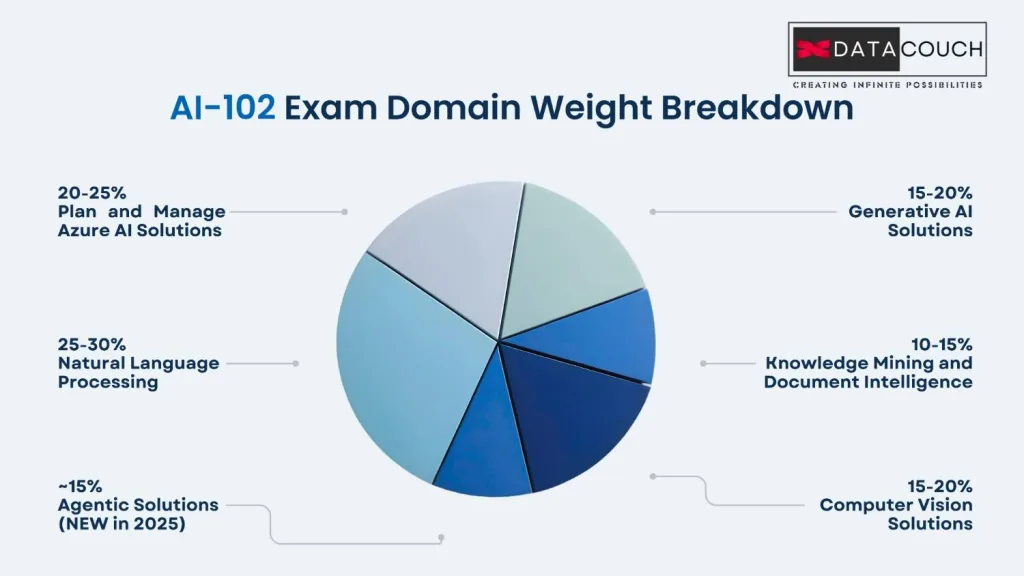
The exam is divided into six skill areas, each with a different weight. Smart students build projects that target the heaviest domains first. Here is the breakdown:
| Exam Domain | Weight | Project That Covers It |
|---|---|---|
| Plan and manage Azure AI solution | 20-25% | Project 5: Responsible AI Tool |
| Generative AI Solutions | 15-20% | Project 1: RAG Chatbot |
| Agentic Solutions (NEW in 2025) | ~15% | Project 2: AI Agent |
| Computer Vision Solutions | 15-20% | Project 3: Vision Pipeline |
| Natural Language Processing | 25-30% | Project 4: NLP Insights API |
| Knowledge Mining and Document Intelligence | 10-15% | Project 3 and 4 (both) |
Pro Tip: NLP is the heaviest domain at 25 to 30% of the exam. Build a strong NLP project first. It gives you the most exam prep value per hour spent.
The 5 AI Projects That Will Set Your Portfolio Apart
Project 1: Enterprise RAG Chatbot (Intermediate | Build Time: 2 to 3 Weekends)
Exam Domain: Generative AI Solutions (15-20%)
A RAG (Retrieval-Augmented Generation) chatbot combines Azure OpenAI with a searchable knowledge base. Instead of a generic chatbot, build it for a specific domain. Think: an HR policy Q and A bot, a legal document assistant, or a product support agent.
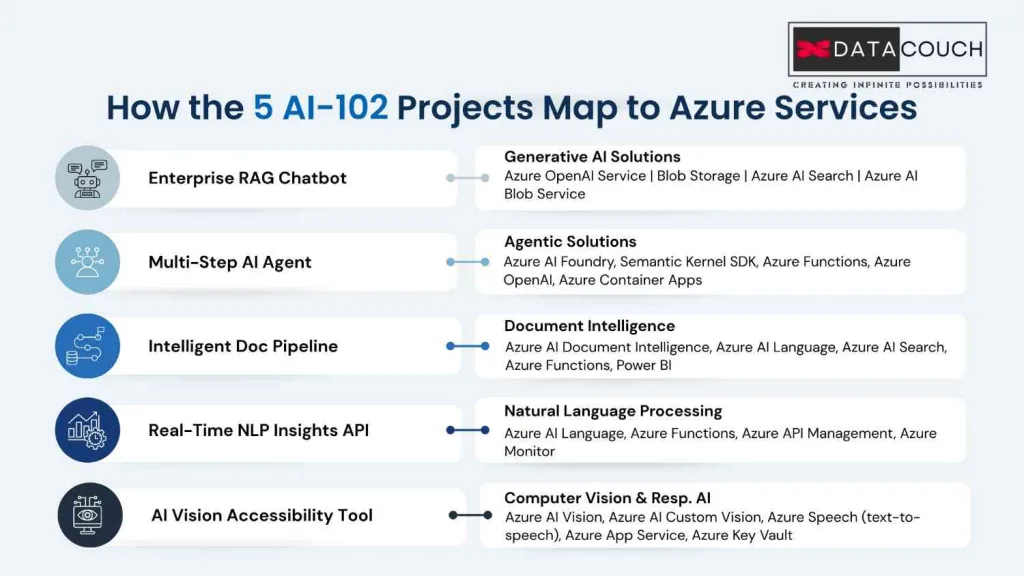
Azure Services Used: Azure OpenAI Service, Azure AI Search, Azure Blob Storage, Azure App Service
What Other Blogs Skip: The Details That Make Recruiters Notice
- Semantic ranking: Add semantic ranking inside Azure AI Search. Most students skip this, but it is tested on the exam and shows real enterprise thinking.
- Token usage logging: Connect Azure Monitor and Application Insights to track latency and token costs. This signals you understand production cost management.
- Domain-specific use case: A chatbot that answers “HR Policy Questions” is 10x more impressive than a generic one. Specificity makes it feel real.
- Chunking strategy: Document whether you used fixed-size or semantic chunking and explain why. Recruiters who understand RAG will be impressed by this decision.
Resume Line: Built an enterprise RAG chatbot using Azure OpenAI and Azure AI Search, with semantic ranking, token cost monitoring via Application Insights, and domain-specific HR policy use case.
Project 2: Multi-Step AI Agent (Advanced | Build Time: 3 to 4 Weekends)
Exam Domain: Agentic Solutions (NEW – added to AI-102 in April 2025)
This is the most underused project idea on the internet right now. Microsoft added Agentic Solutions as a brand-new domain in the April 2025 exam update. Almost no student portfolio covers it yet. That means you can be one of the first candidates with a real agent project in your portfolio.
Azure Services Used: Azure AI Foundry, Semantic Kernel SDK, Azure Functions, Azure OpenAI, Azure Container Apps
The First-Mover Advantage Nobody Is Talking About
Because agentic AI is so new in the exam, hiring managers who are familiar with the updated AI-102 objectives will immediately notice a candidate who has built one. Here is what makes this project stand out:
- Add a custom tool (for example, an API call that retrieves live data like a weather report or a ticket status) so the agent can do more than chat
- Include multi-turn memory so the agent remembers context across the conversation
- Deploy to Azure Container Apps to show production-readiness
- Add Azure AI Content Safety as a guardrail layer to show you think about safety, which maps directly to the Responsible AI section of the exam
Resume Line: Developed a multi-step IT support agent using Azure AI Foundry and Semantic Kernel, with custom tool integration, multi-turn memory, and Azure Content Safety guardrails
Project 3: Intelligent Document Processing Pipeline (Intermediate | Build Time: 2 Weekends)
Exam Domain: Knowledge Mining and Document Intelligence (10-15%)
Document processing is the most common real-world AI use case in healthcare, finance, insurance, and legal industries. Building a pipeline that can ingest documents, extract key information, and make it searchable shows you understand the full data engineering side of AI.
Azure Services Used: Azure AI Document Intelligence, Azure AI Language, Azure AI Search, Azure Functions, Power BI
Why a Visual Dashboard Makes This Project Unforgettable
- Use a real document type like invoices, medical forms, or legal contracts rather than a generic PDF. Domain context makes it feel like a real solution.
- Train a custom extraction model on your own form type. This is an advanced skill that almost no student project demonstrates.
- Add entity linking using Azure AI Language to connect extracted data to a broader knowledge set.
- Show the output in Power BI or even a simple web dashboard. A visual demo takes a recruiter from “that sounds interesting” to “that is actually impressive.”
Resume Line: Built an end-to-end document intelligence pipeline using Azure AI Document Intelligence and Azure AI Language, processing 500 mock invoices with 94% field extraction accuracy, with a Power BI output dashboard
Project 4: Real-Time NLP Insights API (Beginner-Intermediate | Build Time: 1 to 2 Weekends)
Exam Domain: Natural Language Processing (25-30% – The Heaviest Domain)
Because NLP is the single largest domain in the AI-102 exam, building a strong NLP project gives you both the deepest exam prep and the most visible portfolio asset. The key is to go beyond basic sentiment analysis and show the full capability of Azure AI Language.
Azure Services Used: Azure AI Language, Azure Functions, Azure API Management, Azure Monitor
The Multi-Task NLP Trick That Separates You From the Crowd
Most student projects do only one thing: sentiment analysis. Here is what a recruiter-grade project looks like instead:
| Task | Azure AI Language Feature | Business Value |
|---|---|---|
| Sentiment Analysis | Sentiment and Opinion Mining | Understand customer satisfaction |
| Named Entity Recognition | NER | Extract people, places, organizations |
| Key Phrase Extraction | Key Phrase Extraction | Summarize documents automatically |
| Language Detection | Language Detection | Route multilingual content |
| Custom Classification | Custom Text Classification | Categorize support tickets by type |
Wrap the whole thing in Azure API Management with rate limiting and API key access. This maps to the Plan and Manage exam domain and shows you understand API productization, something most student projects never do.
Resume Line: Built a multi-task NLP API using Azure AI Language covering sentiment analysis, NER, key phrase extraction, and custom text classification, deployed via Azure Functions and secured with Azure API Management.
Project 5: AI Vision Accessibility Tool with Responsible AI Card (Intermediate | Build Time: 2 Weekends)
Exam Domains: Computer Vision (15-20%) and Plan and Manage / Responsible AI (20-25%)
This project covers two exam domains at once, making it the most efficient build in this list. It also gives you something no other candidate has: a Responsible AI Transparency Card as part of your portfolio.
Azure Services Used: Azure AI Vision, Azure AI Custom Vision, Azure Speech (text-to-speech), Azure App Service, Azure Key Vault
The Responsible AI Card: The Secret Weapon Nobody Uses
Here is something that almost every blog, course, and YouTube video about AI-102 projects misses: the Responsible AI domain in the exam is not just theory. You can demonstrate it in your portfolio.
A Responsible AI Transparency Card is a one-page document attached to your project that explains:
- What the model does and what it does not do
- Its known limitations and potential biases
- Who it is intended for
- Risks of misuse and how to report problems
No candidate ever includes this. Large enterprise companies actually require this documentation before deploying any AI system. Showing it in a student project signals you think like a professional, not a student.
Build Idea: Scene Describer for Visually Impaired Users. Upload or capture an image, Azure AI Vision extracts a description and reads text via OCR, Azure Speech converts the output to audio, delivered via a clean web app.
Resume Line: Developed an AI accessibility tool using Azure AI Vision and Azure Speech, featuring a Responsible AI transparency card, confidence-based fallbacks, and Azure Key Vault for secure secrets management.
The GitHub README Blueprint: Your Second Resume
Recruiters spend 30 to 60 seconds on a GitHub repo. The README is the only thing that matters. Here is the exact structure that makes a recruiter stop scrolling:
- Project title and one-line description: What does this do and who is it for?
- Problem statement: What real business problem does this solve?
- Architecture diagram: Use draw.io or Excalidraw. Keep it simple. Even a basic diagram shows systems thinking.
- Azure services used: List each service with a link to official docs. This section is ATS gold.
- AI-102 exam domains covered: This signals to technical recruiters that you are cert-aligned.
- Measurable outcome: “Processes 100 PDFs per minute” or “Reduces query time by 60% vs keyword search.”
- How to run: Clean setup instructions with environment variable guidance. Professionalism shows here.
- Cost estimate: Tell readers how you kept it under $10. It shows cost awareness.
- What I would do differently: This section shows reflective thinking. Recruiters love it.
How to Build All 5 Projects for Under $30
The biggest reason students don’t build Azure projects is fear of surprise bills. Here is exactly how to keep costs manageable:
| Service | Free Tier Limit | When You Need to Pay |
|---|---|---|
| Azure AI Language | 5,000 transactions/month free | Beyond 5K calls per month |
| Azure AI Vision | 5,000 transactions/month free | Beyond 5K calls per month |
| Azure Functions | 1 million executions/month free | Almost never in student projects |
| Azure Blob Storage | 5 GB free for 12 months | Storing very large document sets |
| Azure OpenAI (GPT-4o-mini) | $0.15 per 1M input tokens | Under $1 for typical testing |
- New Azure accounts get a $200 credit valid for 30 days. Use this window to run your most resource-heavy tests.
- Delete resource groups after each session. Leaving them running is the main cause of unexpected charges.
- Set a cost alert at $15 inside Azure Cost Management so you get an email before anything significant happens.
How to Talk About Your Projects in an Interview
Most candidates can build but cannot narrate. This is where interviews are won or lost. Use the STAR method for every project:
- Situation: “I was studying for AI-102 and wanted hands-on experience with the NLP domain, which makes up 25 to 30% of the exam…”
- Task: “I needed to build something that could analyze customer feedback at scale for a real business use case…”
- Action: “I used Azure AI Language to run multi-task NLP across sentiment, entity recognition, and custom classification, then wrapped it in Azure API Management…”
- Result: “The API processes text in under 800ms, handles rate limiting, and reduces my token cost by 30% after tuning the batch size…”
The business value framing matters: Don’t say “I built a chatbot.” Say “I built a system that reduces the time a support team spends answering repeat questions from hours to seconds.” This language signals you think about outcomes, not just code.
Ready to Build? Start Here
Upskilling in AI is no longer optional. The Bureau of Labor Statistics projects that roles requiring AI and data skills will grow significantly through 2032, with AI-related engineering roles commanding 50 to 60% salary premiums over standard IT positions.
If you are preparing for the AI-102 Azure AI Engineer certification and want a structured path that covers both the theory and the hands-on lab work, DataCouch’s AI-102 training program pairs instructor-led sessions with real Azure environments so you can build these projects with guidance, not guesswork. You learn the concepts, then immediately apply them.
The certification + portfolio combination is what gets you in the room. The projects in this guide are not extra work on top of your studying. They are your studying, just in a form that recruiters can see.
Key Takeaways
- Map each project to the heaviest AI-102 exam domains so studying and building happen at the same time
- Start with an NLP project because it covers 25 to 30% of the exam, the largest single domain
- Build an AI agent using Azure AI Foundry to take advantage of the new Agentic Solutions domain before other candidates catch on
- Add a Responsible AI Transparency Card to at least one project, no other candidate does this
- Write your GitHub README like a case study, not just a code dump
- All five projects can be built for under $30 using the Azure Free Tier and new account credits
Which of these 5 projects will you start building this weekend? The ones who act first are the ones who get hired first.
Stop studying in theory and start building in practice with DataCouch's AI-102 Azure AI Engineer Course and land your first Azure AI role with confidence.