
From GPU Utilization of 5% to 90%: What Building an AI Factory Actually Looks Like
The real question about AI infrastructure: Not how much GPU capacity you have bought, but how much of it is actually producing intelligence. Most enterprises that own GPU clusters are running them at a fraction of their capacity. Here is how to fix that.
Most conversations about enterprise AI infrastructure focus on what to buy. Which GPU. Which cloud provider? Which platform. How many nodes? What rack density?
Very few conversations? Focus on the far more important? Question: Once you have bought the infrastructure, how much of it is actually working?
The answer, for most enterprises, is uncomfortable. Gartner estimates that only around 40% of AI prototypes ever make it into production, with data availability and quality cited as the top barrier. And among the AI workloads that do reach production, underutilized GPU infrastructure is one of the most consistent and least discussed problems in enterprise AI deployment.
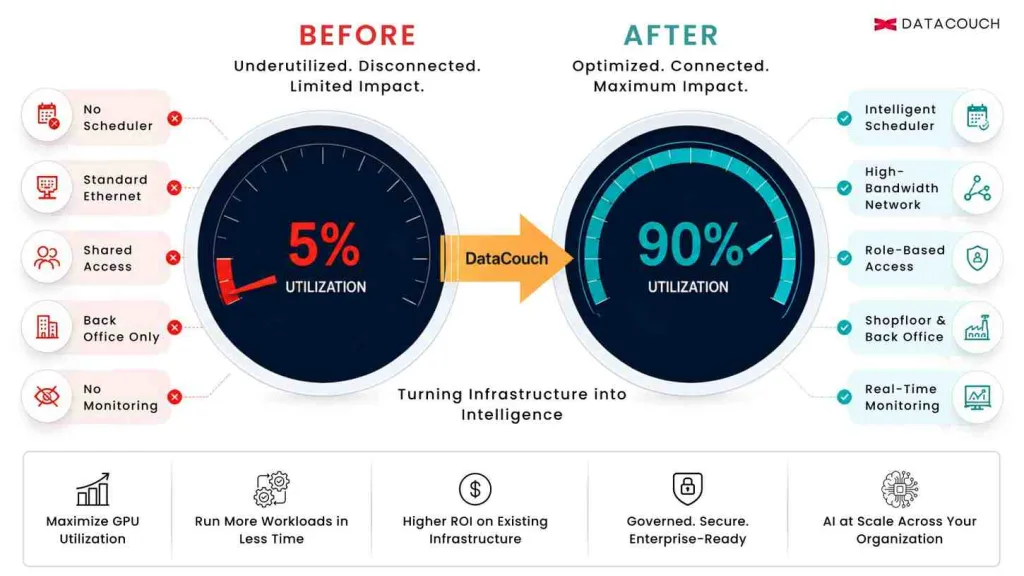
DataCouch worked with a manufacturing enterprise whose GPU cluster was running at under 5% utilization. The hardware was capable. The investment had been made. The AI ambition was real. But the cluster was largely sitting idle while the organization’s AI initiatives stalled.
After the engagement, GPU utilization exceeded 90%. AI workloads were running across both the shopfloor and the back office. The infrastructure the organization already owned was delivering the ROI it was purchased to provide.
This is the story of how that happened, and what every enterprise building an AI factory needs to understand before they make their next infrastructure investment.
The GPU Utilization Problem Nobody Talks About Publicly
Enterprises Are Buying Capability They Cannot Yet Use
The scale of enterprise AI infrastructure investment is staggering. McKinsey projects $5.2 trillion in capital expenditure for AI data center capacity through 2030. Microsoft alone dedicated $80 billion in FY2025 to data center expansion. Amazon allocated $86 billion. Enterprises across every industry are committing to GPU infrastructure as a strategic requirement.
What these investment figures do not capture is the gap between hardware installed and hardware performing. GPU clusters in enterprise environments routinely sit at single-digit utilization percentages, not because of hardware failure, but because of missing layers that no vendor puts in the sales brochure.
What Most Enterprises Do Not Realize About GPU Underutilization
A GPU cluster running at 5% utilization is not a hardware problem. It is a systems and skills problem. The six root causes are almost always the same, regardless of industry, regardless of GPU model, and regardless of whether the deployment is on-premises or in the cloud.
| Root Cause | How It Appears | What Fixes It |
|---|---|---|
| No workload scheduler | Jobs queue manually or run sequentially, leaving GPUs idle between tasks | Intelligent scheduler with priority queues, preemption policies, and burst capacity allocation |
| Networking bottleneck | Multi-GPU training jobs run slowly because data cannot move between GPUs fast enough | High-bandwidth networking fabric (InfiniBand or equivalent) replacing standard Ethernet |
| No quota management | One team monopolizes the cluster while others wait, creating uneven utilization patterns | Per-team and per-project compute quotas are enforced at the infrastructure layer |
| Missing access controls | Shared credentials mean no visibility into who is running what, preventing optimization | Role-based access tied to data classification and use case, with full audit logging |
| Untrained operators | The infrastructure team knows servers, not GPU workload optimization or AI pipeline management | Custom AI infrastructure training covering GPU scheduling, monitoring, and optimization |
| Absent data pipeline | Models cannot train efficiently because the data is not staged correctly for GPU ingestion. | AI-ready data pipelines with GPU-accelerated preprocessing and optimized storage access |
Every one of these root causes is fixable. None of them requires new hardware. All of them require deliberate architectural work, governance design, and team training that the original hardware vendor did not include in the deployment.
Is your GPU infrastructure running at the utilization it was purchased to deliver?
The Case: A Manufacturing Enterprise at 5% GPU Utilization
The Starting Point
The client was a manufacturing enterprise operating across both a production shopfloor and a centralized back office. They had invested in on-premises GPU infrastructure to power AI initiatives across both environments. The investment rationale was sound: real-time quality control on the shopfloor, predictive maintenance, and AI-assisted operations management in the back office.
In practice, GPU utilization remained below 5%. The infrastructure team was capable but had no experience with AI workload management. Jobs ran ad hoc. There was no scheduler, no quota system, and no monitoring. The networking was standard Ethernet, which created bottlenecks whenever multi-GPU jobs attempted parallel processing. Access was shared, which meant no visibility into who was running what or why utilization was inconsistent.
The AI initiatives that were supposed to run on this infrastructure were running slowly, intermittently, or not at all. The organization had purchased an AI capability but had not yet built the operational conditions for that capability to function.
How We Got to 90%: The Five-Phase Engagement
The DataCouch engagement followed the same five-phase framework we apply to every AI factory deployment. The phases are not sequential by calendar — several ran in parallel. But each phase addressed a specific layer of the root cause stack.
Phase 1: Infrastructure Audit and Gap Mapping
Before touching any configuration, we mapped the complete current state: GPU specifications and cluster topology, current networking architecture,e and identified bottlenecks, existing job submission processes, and where they failed, access patterns and credential management practices, and the data pipeline feeding the GPU cluster. This audit revealed that the networking limitation alone was responsible for roughly 40% of the utilization gap. Multi-GPU training jobs were completing in serial rather than parallel because the cluster was not networked for high-bandwidth inter-GPU communication.
Phase 2: Workload Scheduling and Quota Architecture
We implemented an intelligent workload scheduler with priority tiers for production AI workloads versus experimental runs, per-team compute quotas that prevented any single project from monopolizing the cluster, automated job queuing that kept GPUs in active use between submitted jobs, and preemption policies that allowed high-priority jobs to reclaim capacity from lower-priority workloads without manual intervention. This single change — scheduling architecture — was responsible for approximately 35 percentage points of the utilization improvement.
Phase 3: Network Optimization and Storage Architecture
We reconfigured the network fabric for high-bandwidth GPU-to-GPU communication, eliminating the bottleneck that was forcing parallel training jobs to run sequentially. We also redesigned the storage architecture to ensure data was staged for GPU ingestion in a format that matched the access patterns of AI workloads, rather than the sequential access patterns of traditional database queries. GPU-accelerated preprocessing was implemented for the manufacturing image and sensor data that the shopfloor AI models required.
Phase 4: Access Controls, Governance, and Monitoring
We implemented role-based access controls at the compute layer, tied to data classification and use case, with full audit logging of every job submitted. A real-time monitoring dashboard was deployed covering GPU utilization per node, job completion rates, output anomaly detection, and performance benchmarks against defined SLAs. This governance layer had two effects: it improved utilization by eliminating the confusion of shared access, and it gave the organization the visibility to identify and resolve any future bottlenecks without external help.
Phase 5: Team Training and AI Operational Capability
The most important phase, and the one most often skipped by infrastructure vendors, was training the team. We delivered a custom AI infrastructure training program covering GPU workload management and scheduling principles, model deployment and inference optimization, monitoring and incident response for AI systems, data pipeline management for manufacturing workloads, and governance responsibilities for AI systems running across regulated manufacturing environments. Without this phase, the infrastructure improvements would have degraded over time as the team reverted to ad hoc practices.
The Results: What 90% GPU Utilization Actually Means for the Business
GPU utilization rising from 5% to 90% is a technical metric. What it represents in business terms is more significant.
| Metric | Before DataCouch Engagement | After DataCouch Engagement |
|---|---|---|
| GPU utilization | Under 5% — clusters sitting largely idle across shifts | Over 90% — consistent production-level compute throughput |
| Workload scheduling | Ad hoc, manual, no priority queue or quota management | Intelligent scheduling with priority tiers and per-team quota allocation |
| Networking | Standard Ethernet is causing inter-GPU communication bottlenecks | Optimized high-bandwidth network fabric for parallel AI workloads |
| Access controls | Shared credentials, no role-based compute access | Role-based access controls per team, use case, and data classification |
| AI deployment scope | Isolated experiments in the back office only | AI running across both shopfloor operations and back-of-the-house functions |
| Model monitoring | No behavioral monitoring or drift detection in place | Real-time monitoring dashboards with alerting on output anomalies |
| Team capability | No structured AI infrastructure training for the operations team | Custom training program delivered for data engineering and the ops teams |
The Business Impact Beyond the Utilization Number
The manufacturing client was now running AI workloads that had previously been impossible to deploy reliably. Shopfloor quality control models were processing production line imagery in real time. Predictive maintenance models were running on sensor data from the production floor. Back-office AI workloads — demand forecasting, procurement optimization, and operations planning — were running simultaneously without competing for compute capacity.
The critical financial implication is this: the hardware investment was already made. The organization paid for GPU capacity that was sitting at 5% utilization. Every percentage point of utilization improvement above that baseline was pure return on an asset already purchased. The engagement did not require new hardware. It required the systems, governance, and training that should have accompanied the hardware from day one.
KPMG’s Q4 2025 AI Pulse Survey found that enterprises project deploying $124 million on AI annually, with 92% planning to increase AI budgets over the next three years. Yet McKinsey found that only 1% of organizations consider their AI strategies mature.
Source: KPMG AI Pulse Survey Q4 2025 / McKinsey State of AI 2025
The gap between AI investment and AI maturity is largely an operational gap, not a technology gap. Most organizations are buying more compute before they have learned to use the compute they already own. The manufacturing case above is not exceptional. It is representative.
We specialize in custom AI programs and globally recognized certification training at scale.
What Every Enterprise Building an AI Factory Can Learn From This
The Hardware Decision Is Not the Hard Part
Choosing a GPU is not the hardest infrastructure decision an enterprise makes. Configuring, governing, scheduling, monitoring, and training people to operate a GPU cluster at production-level utilization is the hard part. The hardware is a commodity. The operational capability is the competitive advantage.
Governance Must Be Designed Before Deployment, Not After
Every governance problem we encountered in the manufacturing engagement would have been significantly cheaper to address before the cluster was deployed: access controls built into the architecture from day one, monitoring deployed alongside the hardware, data pipelines designed for GPU-native access patterns rather than retrofitted later. Retroactive governance costs more time and more money than proactive governance design.
Training Is Infrastructure
The team training component of this engagement was not a soft addition. It was infrastructure in the same sense that networking is infrastructure. Gartner’s AI maturity research found that high-maturity organizations — those keeping AI in production for three-plus years — have dedicated AI leaders and run formal financial analysis on AI initiatives. The distinguishing characteristic is not their hardware. It is their people’s capability to govern and operate it.
Scope AI Across Both Operational Environments From the Start
One of the clearest ROI improvements in the manufacturing engagement came from extending AI workloads from the back office to the shopfloor. These two environments have different latency requirements, different data types, and different governance constraints. But they share the same underlying GPU infrastructure once that infrastructure is properly scheduled and networked. Organizations that treat shopfloor AI and back-office AI as separate initiatives requiring separate infrastructure investments are creating unnecessary cost and complexity.
Applying These Lessons to Your AI Factory Planning
Before your organization commits its next tranche of GPU infrastructure budget, these are the questions worth answering honestly.
- Current utilization baseline: What is your GPU cluster running at today? If you do not know the number, the absence of monitoring is itself a root cause to address.
- Scheduling architecture: Do you have an intelligent workload scheduler in place? Is it configured with priority queues, quota management, and preemption policies?
- Networking assessment: Is your inter-GPU networking optimized for parallel AI workloads? Standard Ethernet is a production bottleneck for multi-GPU training at any meaningful scale.
- Access and governance: Are access controls tied to data classification and use case? Do you have full audit logging of compute usage? Can you identify who is running what, and why?
- Data pipeline readiness: Is your data staged for GPU-native access patterns? Are preprocessing workloads running on CPU when they should be GPU-accelerated?
- Team capability: Has your infrastructure team received AI-specific training on workload management, model monitoring, and governance? Or are they applying traditional server management practices to AI systems that require a different approach?
Key Takeaways: What 5% to 90% Actually Teaches Us
- GPU underutilization is not a hardware problem. It is a scheduling, networking, governance, and training problem. The root causes are consistent across organizations, and all are fixable without new hardware.
- The most common cause of underutilization is the absence of an intelligent workload scheduler. This single fix often delivers the largest single improvement in utilization.
- Networking is as important as computing in an AI factory. Standard Ethernet creates bottlenecks that prevent computing-GPU parallel processing, which is precisely the workload pattern that AI training and inference require.
- Governance design should precede deployment. Access controls, monitoring, and audit logging are cheaper to build before a cluster is live than to retrofit after production workloads are running on it.
- Team training is infrastructure, not optional. Organizations that deploy GPU capability without training the people operating it will see utilization decay back toward the baseline over time.
- On-prem AI factories enable sovereign AI: all data, all models, all governance within the organization’s own infrastructure boundary. For regulated manufacturing, financial services, and government environments, this is not a preference. It is a requirement.
Here is the question worth asking before your organization’s next infrastructure budget review: how much of the GPU capacity you already own is producing intelligence today, and what is the gap between that number and what it should be?
The answer to that question is worth more than any new hardware purchase until it is resolved.