Mastering GitHub Copilot for 10x Productivity
Imagine it’s 11 PM. A senior developer named Arjun is staring at a deadline. His team has to ship a feature by morning. Six months ago, he would have been buried in boilerplate code, Stack Overflow tabs, and cold coffee. But tonight, he types a single instruction into his IDE: “Add input validation to all auth routes, following our error handling pattern in utils/errors.ts.” Then he watches GitHub Copilot plan the task, write the code across five files, and prepare a draft pull request. He reviews. He ships. He sleeps.
That is not a futuristic scenario. That is what is happening right now in engineering teams around the world in 2026. And the developers and leaders who have not adapted yet? They are quietly falling behind.
Here is the surprising truth about GitHub Copilot in 2026: most developers are using less than 20% of its actual capability. This blog will show you the rest.
GitHub Copilot Is Not What It Used to Be
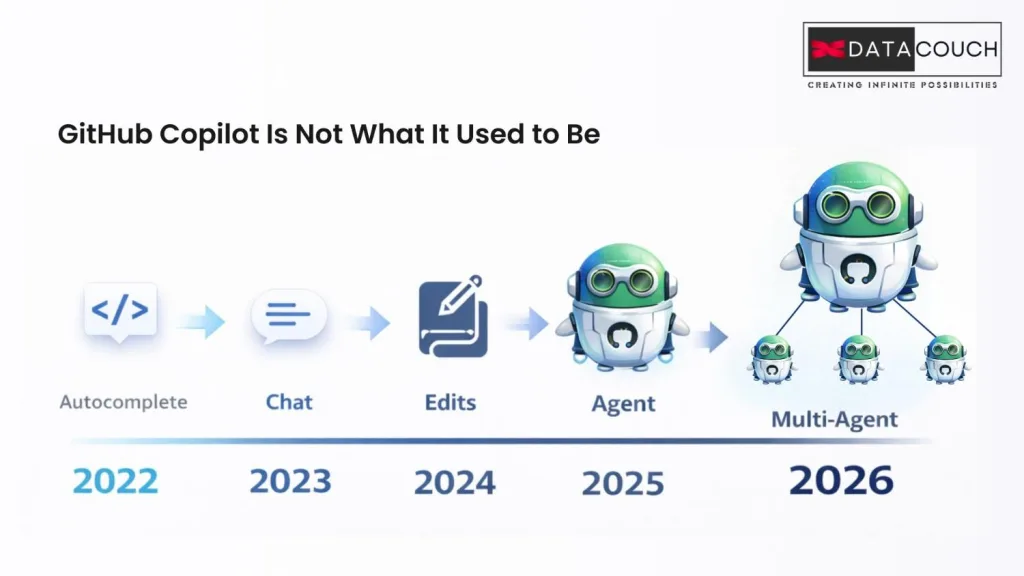
If the last time you seriously looked at GitHub Copilot, it was suggesting the next line of your code, you need to update your mental model. The tool has gone through a complete transformation.
The evolution looks like this:
- 2022: Inline code completion (smart autocomplete)
- 2023: Copilot Chat (ask questions, get explanations)
- 2024: Copilot Edits (make changes across multiple files)
- 2025: Agent Mode and Copilot Coding Agent (fully autonomous task execution)
- 2026: Multi-agent orchestration, MCP integration, custom agent libraries, and parallel subagents
The VS Code January 2026 update transformed the editor into a multi-agent orchestration hub, where Copilot can spin up parallel subagents to tackle different parts of a task simultaneously. And at Microsoft Build 2025, GitHub announced the Copilot Coding Agent, which lets you assign a GitHub issue to Copilot and come back to review a finished pull request.
The developers treating Copilot as a fancy autocomplete are getting 10 to 20% productivity gains. The ones using the full agentic stack are operating at a completely different level.
"Want to go from Copilot basics to agentic workflows fast? DataCouch's GitHub Copilot course gets your team there with hands-on labs”
The Feature Stack: Three Tiers Most Blogs Never Explain
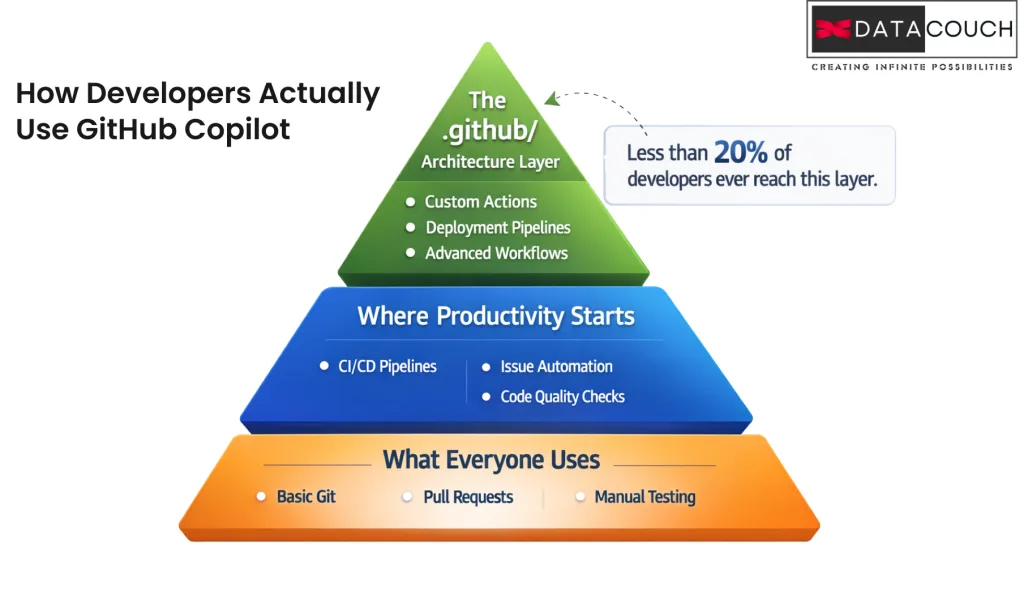
Tier 1: What Everyone Knows (But Uses Incompletely)
Inline completions, Copilot Chat, and multi-file edits with Copilot Edits. These are available across VS Code, Visual Studio, JetBrains, Neovim, Xcode, and Eclipse. Most developers stop here.
Tier 2: Where Real Productivity Starts
- Agent Mode: Copilot autonomously analyzes your codebase, proposes edits, runs tests, and fixes errors across multiple files. It is the difference between a suggestion and a solution.
- Plan Mode: Review and approve the blueprint before the agent writes a single line. Critical for complex tasks.
- Copilot Coding Agent: Assign GitHub issues directly to Copilot. It pushes commits to a draft PR while you track its progress in session logs.
- Copilot CLI (Terminal Agent): Build, debug, and deploy using natural language from your terminal, with experimental cross-session memory.
- Vision for Copilot: Feed a screenshot or mockup. Copilot generates UI code from images.
Tier 3: The Architecture Layer That Almost No Blog Talks About
This is where 10x productivity actually lives, and it is almost entirely ignored in most articles about GitHub Copilot.
- .github/copilot-instructions.md: A custom instructions file in your repository that shapes ALL of Copilot’s behavior for your codebase. Your tech stack, your naming conventions, your error handling approach, your “never do this” rules. Write it once and Copilot follows it forever, for every teammate. Most teams have no idea this file exists.
- AGENTS.md: Repository-level instructions that sync all agents with your team’s coding practices automatically.
- Path-specific instructions: Separate .instructions.md files that apply different rules to TypeScript files vs. Python files vs. infrastructure code.
- Custom Agents (.agent.md): Build specialized AI personas for your team. A Security Reviewer agent. An Architect agent. A Test Writer agent. Each with its own model, tools, and behavior.
- Reusable Prompt Files (.prompt.md): Save common workflows as slash commands. /create-pr, /write-tests, /review-security. One command, consistent output, every time.
- Model Context Protocol (MCP): Connect Copilot to your database schema, your CI/CD pipeline, your observability tools. Copilot stops being a general AI and starts being YOUR AI.
For engineering leads and CTOs: the .github/ folder is a strategic asset, not a configuration file. Version-controlled, team-shared, and continuously improved, it is the difference between Copilot being a personal tool and being a team multiplier.
Most developers never reach Tier 3 on their own - DataCouch's GitHub Copilot training walks your team through every layer, from inline completions to custom agents.
The Numbers You Need to Know (And the Ones That Should Worry You)
- GitHub Copilot has 15 million+ users as of 2025, a 400% increase in one year
- Developers write code 55% faster with Copilot in controlled testing GitHub / IDEO Study
- 68% of developers used Copilot in the Stack Overflow Developer Survey 2025 Stack Overflow
- Copilot writes 46% of the average developer’s code (up to 61% in Java)
- It takes 11 weeks for developers to see real productivity gains. Most quit before then.
The Productivity Illusion Nobody Talks About
Here is what most blogs on GitHub Copilot will not tell you: feeling faster is not the same as shipping faster.
A GitClear analysis of over 150 million changed lines found that AI-assisted code creates a meaningful uptick in ‘churn code’ (code written and then reverted or reworked) and a decrease in code reuse. Larger pull requests take longer to review. Security vulnerabilities in AI-generated code run about 20 to 30% higher than in human-authored baselines.
The problem is not Copilot. The problem is using Copilot without a system around it.
The Junior Developer Trap
Research published in the Communications of the ACM found that junior developers accept significantly more Copilot suggestions than senior developers. A healthy acceptance rate is 25 to 35%. Many junior devs run above 50%, becoming dependent rather than skilled.
The best engineering teams have started implementing ‘Copilot-free Fridays,’ one day a week without AI assistance, specifically to prevent skill atrophy and to identify where Copilot adds real value versus where it creates a crutch.
GitHub Copilot vs. The Competition: The Honest Comparison
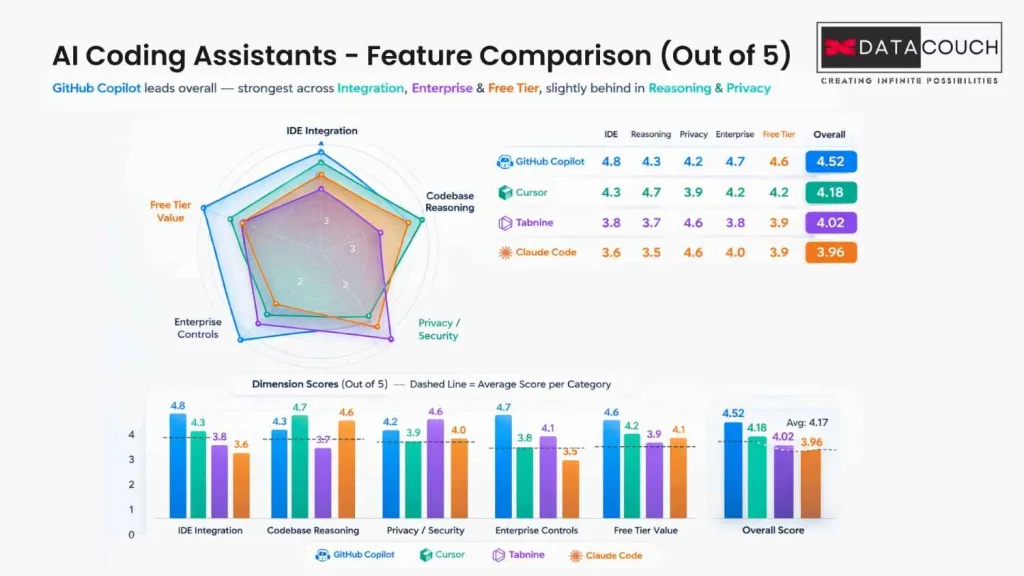
Choosing the right AI coding tool in 2026 is a real decision for teams and leaders. Here is a clear, no-hype breakdown.
| Tool | Best For | Price/User/Mo | Key Differentiator |
|---|---|---|---|
| GitHub Copilot | Most dev teams; GitHub ecosystem | Free / $10 / $19 / $39 | Native GitHub integration, multi-model, agentic DevOps loop, 68% market adoption |
| Cursor | Large codebase reasoning | $20 | VS Code fork with deep codebase understanding; ranked #1 in independent evaluations for large projects |
| Windsurf (Codeium) | Free-tier teams; privacy | Free / $10+ | Cascade Agent; offline mode; no training on private code |
| Amazon Q Developer | AWS-native teams | Free tier + paid | Deep AWS integration; /dev, /doc, /review agents built in |
| Tabnine | Air-gapped enterprise | $15 to $40 | Fully local model execution; trains on your own codebase; zero data leaves your machine |
| Claude Code | Architecture and code review | $20 to $100 | Terminal-based; strongest for architectural reasoning and complex refactors |
The Hybrid Stack That Most Blogs Ignore
The most productive senior developers in 2026 are not picking one tool. They use GitHub Copilot for IDE workflows and GitHub integration, combined with Claude Code for terminal-based architectural work and complex code review. These two tools complement each other and the combined output consistently outperforms either tool alone.
The Security Risk Nobody Is Talking About
Security researchers discovered in 2025 that attackers can inject malicious instructions into Copilot and Cursor configuration files, causing these tools to silently generate backdoored code. This prompt injection attack vector operates through repository config files and is an emerging threat that every engineering leader needs to be aware of. Copilot’s built-in push protection helps for public repos, but private codebases require additional vigilance and code review policies.
The Mastery Playbook: How to Actually Get to 10x
Step 1: Build Your Team's Copilot DNA in .github/
Most teams use Copilot as a generic, out-of-the-box tool and wonder why results are inconsistent. The fix is building a version-controlled Copilot configuration that makes the tool work for your specific codebase.
- Create .github/copilot-instructions.md with your stack, conventions, error patterns, and anti-patterns
- Add path-specific instructions in .github/instructions/ so TypeScript files get different guidance than infrastructure code
- Build a custom agent library in .github/agents/ with a Security Reviewer, an Architect, and a Test Writer agent
- Save your most-used workflows as slash commands in .github/prompts/ for repeatable, consistent output
Step 2: Prompt Like a Senior Engineer, Not a Junior One
The quality of Copilot’s output is directly tied to the quality of your instructions. Vague prompts produce vague code.
- Be specific about goals: “Refactor userController.ts to add express-validator input validation on all POST routes, matching our error pattern in utils/errors.ts”
- Use Plan Mode first: Review the blueprint before the agent executes. This saves significant rework time.
- Set boundaries: “Plan only, do not make changes yet”
- Attach URL context: Paste documentation URLs in Copilot Chat for accurate, grounded responses
Step 3: Use the Agentic Workflow for Maximum Output
The Copilot Coding Agent is the highest-value, least-used feature in 2026. The workflow is simple.
- Write a detailed, specific GitHub Issue
- Assign the issue to Copilot
- Monitor the session logs while it works
- Review the draft PR it creates
- Iterate via Copilot Chat inside the PR
This works best for bug fixes, documentation updates, UI cleanups, adding test coverage, refactoring tasks, and security remediations. A task that takes a developer two hours can be delegated to the Copilot agent in minutes of review time.
Step 4: Measure the Right Things
Stop measuring how fast developers write code. Start measuring outcomes.
- Acceptance Rate: Healthy range is 25 to 35%. Below this means suggestions are irrelevant. Above 40% is a warning sign for over-reliance.
- PR Cycle Time: If Copilot is helping, this should decrease. If it is increasing, you have a code review cost problem.
- Code Churn Rate: AI-generated code should not increase the rate of rewrites. If it does, tighten your instructions file.
- Security Debt: Track vulnerabilities in AI-touched code separately and enforce 85% test coverage on Copilot-assisted work.
What Engineering Leaders and CTOs Need to Know
Individual developer productivity is only part of the story. For managers, team leads, and CTOs, the decisions around GitHub Copilot are strategic.
The Three Tiers of GitHub Copilot for Teams
- Copilot Free: 2,000 completions and 50 chat messages per month. Good for evaluation.
- Copilot Business ($19/user/month): Organization-wide policy controls, usage analytics, SSO, audit logs, and a guarantee that your code is not used for training.
- Copilot Enterprise ($39/user/month): All of the above, plus Copilot trained on your private codebase, custom knowledge bases, and Copilot Workspace.
For GCCs and air-gapped environments, Tabnine remains the only fully on-premises solution. For most enterprise teams, Copilot Business is the right starting point.
The governance gap is real: banning AI tools outright puts your organization at a competitive disadvantage. The better approach is to choose approved tools, implement mandatory security scanning on AI-touched code, establish a clear acceptable use policy, and measure with engineering analytics from day one.
The Corporate Training Gap Nobody Is Addressing
Here is a pattern we see repeatedly in enterprise teams: companies purchase Copilot licenses and see flat productivity for months. The issue is almost never the tool. It is the lack of structured upskilling. Developers do not know about AGENTS.md. Team leads have not seen Plan Mode. CTOs are buying a formula-one car and handing the keys to drivers who have only ever driven automatics.
This is where intentional corporate training changes the outcome completely. Structured learning programs that take developers from basic Copilot usage to agentic workflows and MCP integration can compress that 11-week productivity curve into 2 to 3 weeks. DataCouch’s GitHub Copilot training program is built exactly for this, taking development teams from casual users to power users with hands-on lab environments and real workflow integration.
What Is Coming Next: The 2026 Roadmap
The developers who invest in understanding Copilot’s direction now will have a meaningful head start on the teams that wait.
- Project Padawan: Assign GitHub issues to Copilot entirely; it completes the task and creates PRs with no human involvement until review.
- Cross-session memory in Copilot CLI: Ask Copilot about past work, files, and decisions across sessions.
- Multimodal input: Screenshots and wireframes become working code.
- Task-aware model routing: Copilot automatically selects the best AI model for each specific task type, balancing speed and reasoning depth.
- Third-party coding agents: Claude by Anthropic, OpenAI Codex, and others can be assigned GitHub issues alongside Copilot, creating a true multi-agent development environment.
- Open-sourced Copilot Chat: GitHub has open-sourced Copilot Chat in VS Code, enabling community-driven extensions and contributions.
The horizon that most people are not seeing yet: by the end of 2026, the primary role of many senior developers will shift from writing code to directing teams of specialized AI agents. The developers who understand agent architecture today will be the engineering leads of tomorrow.
Key Takeaways
- GitHub Copilot in 2026 is a full agentic platform, not a code suggestion tool. Most developers are using less than 20% of its capability.
- The .github/ architecture (instructions, agents, prompts, hooks) is the most powerful and most ignored feature set in the entire product.
- Feeling faster and shipping faster are not the same thing. Measure acceptance rate, PR cycle time, code churn, and security debt.
- Junior developers are most at risk of skill atrophy. Implement healthy limits, code review requirements, and structured upskilling programs.
- The hybrid stack wins. GitHub Copilot for IDE and GitHub workflows, combined with Claude Code for architectural reasoning, outperforms any single tool.
- Corporate training is the missing piece. Buying Copilot licenses without structured upskilling is the single biggest reason teams see flat productivity for months.

Ready to take your team from Copilot basics to agentic mastery? DataCouch's GitHub Copilot: Enhancing Daily Workflow course gives developers the structured, hands-on path to get there.