
AI-102 Roadmap to Crack Azure AI Engineer Exam
You’re scrolling through LinkedIn and see another classmate land an AI Engineer role at a Fortune 500 company. The salary? Six figures. The secret? An AI-102 certification on their resume.
Here’s what’s happening: AI Engineer became the fastest-growing job in 2025, with 1.3 million new positions created in just two years, according to LinkedIn’s Jobs on the Rise report. As we move through 2026, this trend is accelerating even faster. Companies need people who can build real AI solutions, not just talk about them.
What is AI-102? The Microsoft Azure AI Engineer Associate certification proves you can design, build, and deploy AI solutions using Azure’s cloud platform.
In this guide, we’ll walk through everything you need to crack this exam in 2026. We’re covering the stuff other blogs skip, like understanding the current exam format (updated in April 2025), the hidden costs students face, and how to avoid the “time trap” that makes people fail.
Let’s get you certified.
Here’s what most people miss: this isn’t just about employee development. It’s a calculated business move that’s reshaping how the entire tech industry hires, trains, and values talent. And if you’re an educator, this shift matters more than you think.
Let me explain why.
Why Students Should Care About AI-102 in 2026
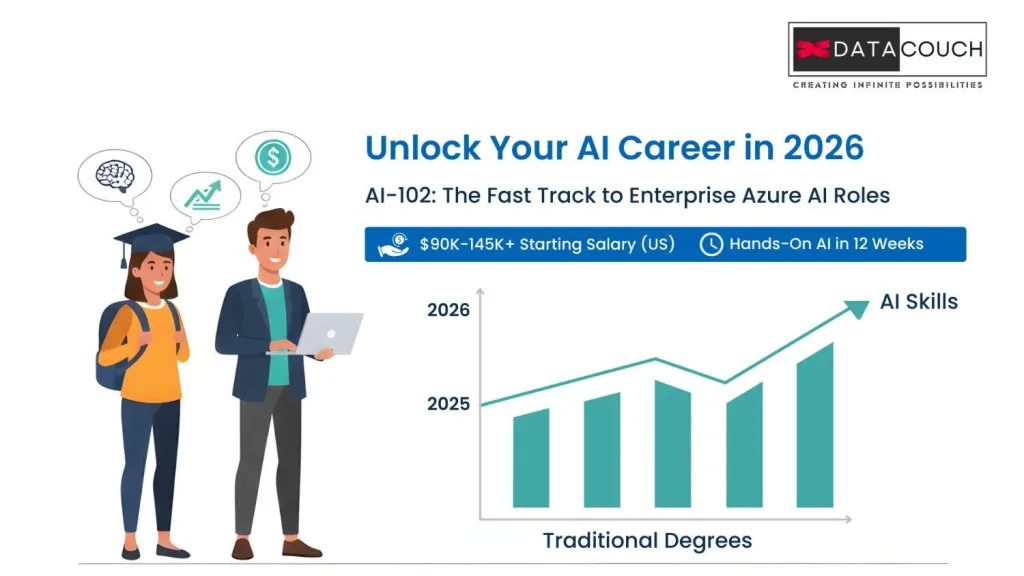
The numbers don’t lie. By the end of 2025, AI literacy requirements had jumped 70% year-over-year in US job postings. In early 2026, that gap is widening further. Meanwhile, Azure dominates the enterprise market with over 95% of Fortune 500 companies using their services.
Here’s the part that matters to you: certification pays off fast. According to Pearson VUE’s 2025 Value of IT Certification Report, 63% of professionals got promoted after earning their certification. Another 35% saw direct salary increases.
The median salary for AI Engineers reached $145,000 in 2025. As we move through 2026, even entry-level positions start around $90,000 to $100,000. That’s significantly higher than general software developer roles.
But here’s the catch: most university training programs barely scratch the surface of Azure skills. You learn theory in class. Employers want practical, cloud-based AI implementation experience. The AI-102 certification bridges that gap.
Think of it this way. You can spend four years getting a degree that teaches you algorithms. Or you can spend 12 weeks getting a certification that teaches you how to deploy those algorithms on the platform that 80% of companies actually use for their workloads.
The job market moved fast in 2025. In 2026, student career development strategies need to be even faster.
Understanding the Current AI-102 Exam (2026 Edition)
Here’s what you need to know right away: Microsoft redesigned the AI-102 exam in April 2025. If you’re finding study materials from 2024 or early 2025, they’re outdated.
The current exam puts Azure OpenAI Service front and center. This wasn’t a major focus in the old version. Now it’s critical. You need to know GPT-4 deployments, prompt engineering techniques, and Retrieval-Augmented Generation (RAG) patterns.
The exam includes a domain called “Generative AI Solutions” that makes up 10-15% of your score. Miss this section and you’re starting with a handicap.
Azure AI Foundry (what used to be called Azure AI Studio) is the standard now. The old workflows are gone.
Conversational Language Understanding (CLU) replaced LUIS (Language Understanding Intelligent Service). Completely different architecture, completely different approach.
The current exam domain breakdown looks like this:
| Domain | Weight | What It Tests |
|---|---|---|
| Plan and manage Azure AI solution | 15-20% | Resource setup, cost management, security |
| Implement decision-support solutions | 10-15% | Anomaly detection, content moderation |
| Implement computer vision solutions | 15-20% | Image analysis, custom vision, face recognition |
| Implement natural language processing | 25-30% | Text analytics, translation, conversational AI |
| Implement knowledge mining | 10-15% | Document Intelligence, search solutions |
| Implement generative AI solutions | 10-15% | Azure OpenAI, prompt engineering, RAG |
Notice that NLP section? It’s the biggest chunk. Yet most students spend equal time on everything and wonder why they fail.
What’s new in 2026: Microsoft has been rolling out updates to Azure AI services monthly. The exam now includes questions about multi-agent AI systems, which Gartner predicted would be in 40% of enterprise applications by the end of 2026. You need to understand orchestration patterns and agent collaboration frameworks.
The Real Cost of Getting AI-102 Certified (2026 Budget Breakdown)
Let’s talk about money. Universities teach you theory for free (well, tuition). Getting AI-102 certified costs real cash upfront.
Here’s the honest breakdown for 2026:
Exam Fee: $165 USD (Microsoft’s standard certification exam price, unchanged)
Practice Exams: $25-50 if you buy quality practice tests (optional but recommended, prices went up slightly in 2026)
Azure Lab Costs: This is where students get burned. You need hands-on practice. Azure gives you $200 in free credits for new accounts, but that disappears fast if you’re not careful.
Here’s the strategy nobody tells you: stick to free tier services as much as possible during your learning phase.
Free Tier Services You Can Use in 2026:
- Azure AI Services: 5,000 transactions per month free
- Computer Vision: 5,000 transactions per month free
- Language Services: 5,000 text records per month free
- Azure OpenAI: Limited free playground access, but production use requires credits
Cost Optimization Tricks:
- Delete resources immediately after labs: Set up a script to auto-delete resources older than 24 hours
- Use the $100 GitHub Student Developer Pack credits: If you have a .edu email, grab this
- Set spending alerts at $50: Don’t wait until you’ve burned through $200
- Practice on weekends: Run labs when you have time to complete them in one session
- Use Azure’s new student subscriptions: In 2026, Microsoft expanded student benefits through their education program
Total realistic cost for a student in 2026: $200-275 (exam fee + practice materials + careful Azure usage).
Compare that to the salary bump you’ll get. If certification helps you land a job paying even $10,000 more per year, you’ve got a 3,600% return on investment in year one.
Your 12-Week Study Roadmap (2026 Student Edition)
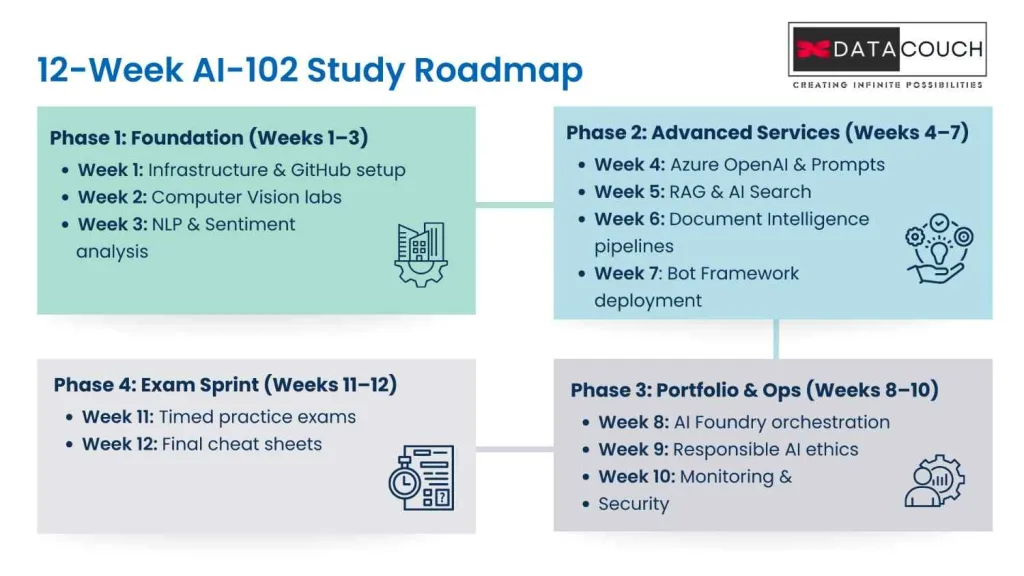
Most guides tell you “study for 8–12 weeks” and leave you hanging. So here’s a practical roadmap that assumes 10–15 hours/week (realistic if you’re balancing classes).
But before we start, one honest reality check.
Self-Study vs. Structured University Enablement (What We See in 2026)
A 12-week self-study plan can work, but outcomes are inconsistent for most students because:
- progress depends on personal discipline and time availability
- labs get skipped when Azure credits run out
- students over-read Microsoft Learn and under-practice real implementation
- the “Microsoft Learn trap” (during exam) hits hard when concepts are not internalized
That’s why many universities prefer a structured, instructor-led enablement approach.
At DataCouch, we delivered the complete AI-102 enablement for UPES in 32 hours, plus an additional 8 hours focused only on exam readiness. The goal was simple: compress learning time without compromising hands-on depth, and prepare students before they fall into the Microsoft Learn trap.
For universities, the difference is clear:
- Self-study: 12 weeks, uneven completion, mixed results
- DataCouch enablement: accelerated delivery + guided labs + focused exam prep, with 95%+ certification success rate when students follow the program as designed
Now, if you’re a student studying solo, the 12-week plan below is still your best path. If you’re a university, this roadmap also helps you see exactly what to cover, and where students typically need structured support.
Weeks 1–3: Foundation Phase
Week 1: Get Your Environment Ready
Don’t jump into studying yet. Set up your infrastructure first.
- Create your Azure account (and set spending alerts)
- Install VS Code and Azure extensions
- Set up a GitHub repo for your projects (you’ll use it for your portfolio)
- Understand Azure AI resource basics, pricing models, and the Azure portal flow
Time allocation: 60% hands-on setup, 40% documentation
DataCouch note (University mode): We don’t let students “waste Week 1.” This is handled fast with guided onboarding so students start building in the first few hours.
Week 2: Computer Vision Deep Dive
Learn:
- image analysis and OCR basics
- object detection workflows
- Custom Vision training + deployment
Project: Build a simple image classification app (even a “dog breeds classifier” works).
DataCouch note: Labs are the difference here. Students remember APIs when they deploy a working endpoint, not when they read docs.
Week 3: Natural Language Processing Basics
Learn:
- Text Analytics (sentiment, entity recognition, key phrases)
- Translator API
- CLU (Conversational Language Understanding), since LUIS is phased out
Project: Sentiment analysis dashboard for customer reviews.
DataCouch note: We align this directly to the exam domain weighting so students don’t study “everything equally.”
Weeks 4–7: Advanced Services (The Heavy Lifting)
Week 4: Azure OpenAI Service (Most Important)
This is the make-or-break section for 2026.
Learn:
- deployment basics and model options
- tokens, context windows, and cost controls
- prompt engineering for real scenarios
- content filtering and responsible AI guardrails
Critical skill: Build a basic chatbot. Deploy it. Break it. Fix it. Repeat.
How DataCouch handles this: In our university enablement model (like UPES), we run this as structured lab sessions so students don’t get stuck in documentation loops. This is also where we prepare students to avoid the Microsoft Learn trap by building confidence through hands-on repetition.
Ready to start your AI-102 journey?
Explore DataCouch's hands-on Azure AI Engineer certification training with virtual labs and expert guidance.
Week 5: RAG Patterns and Azure AI Search
Learn:
- vector search, semantic ranking, hybrid search
- embeddings + Azure AI Search integration
- retrieval pipelines and grounding patterns
Project: RAG chatbot answering questions from university course documents.
DataCouch note: This is one of the biggest differentiators for employability. We push students to ship a working demo, not just finish a module.
They created something called the AI Experience Zone. It’s not a classroom. It’s a hands-on lab where employees work on real AI projects using Azure tools. They’re not just learning. They’re building.
But here’s what makes this interesting for educators: TCS discovered that certified employees close deals 40% faster than non-certified ones. Their project success rate is 2.5 times higher. Client satisfaction scores jump by 25%.
Certification isn’t just a resume line. It’s directly tied to business outcomes.
Week 6: Document Intelligence
Learn:
- prebuilt models (invoice, receipt, ID, etc.)
- custom extraction models
- integrating extraction output into search flows
Project: Invoice processing pipeline that extracts key fields automatically.
Week 7: Conversational AI and Bot Framework
Learn:
- bot architecture and channel deployment
- Question Answering service (post QnA Maker era)
- real deployment steps and troubleshooting
Project: Deploy an FAQ bot for a fictional business.
DataCouch note: This is where universities get the most value from enablement. Students struggle with deployment steps when learning solo. Guided labs save huge time.
Weeks 8–10: Portfolio Building and Advanced Topics
Week 8: Azure AI Foundry (Essential in 2026)
Learn:
- model catalog workflows
- prompt flow orchestration
- multi-agent solution patterns (high-level understanding + use cases)
- CI/CD integration basics
DataCouch note: We teach students how to think like engineers: workflows, monitoring, deployment and iteration, not just “finish the syllabus.”
Week 9: Responsible AI (Critical in 2026)
Learn Microsoft’s principles and apply them:
- fairness, reliability, privacy, inclusiveness, transparency, accountability
- bias checks and evaluation mindset
- Azure AI Content Safety implementation basics
- practical compliance awareness (GDPR, HIPAA, and general AI governance)
DataCouch note: In university training, this is handled with case scenarios so students don’t treat it like theory.
Week 10: Monitoring and Operations
Learn:
- Application Insights for AI apps
- Azure Monitor and alerting
- RBAC + Managed Identity
- Key Vault for secrets
- containers and deployment basics (ACI/AKS fundamentals)
DataCouch proof point: In our university programs, students who learn ops basics don’t just pass AI-102, they perform better in interviews because they understand production readiness.
At DataCouch, we’ve trained over 25,000 professionals globally since 2016. The students who build these operational skills don’t just pass the exam. They get hired faster because they think like engineers, not just test-takers.
Weeks 11–12: Exam Preparation Sprint (Before the Microsoft Learn Trap)
Week 11: Practice Exams and Weak Spot Hunting
- Take a timed practice exam (120 minutes)
- Review every wrong answer with reasoning (not just the correct option)
- Track weak domains and fix them fast
Week 12: Final Review and Mental Preparation
- Create one-page cheat sheets per service (limits, pricing logic, use cases)
- Take 2 more practice tests and aim for 85%+ consistently
- Rest the day before the exam
How DataCouch optimizes this for universities:
Instead of stretching exam prep over 2 weeks informally, we run a focused sprint. For UPES, we delivered 32 hours training + 8 hours dedicated test prep, and we drive outcomes with structured practice and exam strategy sessions. That’s exactly how we maintain a 95%+ success rate when students follow the program.
If you’re a university looking to enable students quickly, self-study roadmaps are helpful, but outcomes vary. DataCouch’s university enablement model compresses the learning curve with instructor-led labs, deployment-first training, and targeted exam readiness before students fall into the Microsoft Learn trap, driving 95%+ certification success and job-ready project portfolios.
The Microsoft Learn "Time Trap" Nobody Warns You About
Here’s something that shocked us when we surveyed test-takers throughout 2025: many used the entire 120 minutes and still left questions unanswered.
Why? Microsoft Learn documentation is accessible during the exam. Sounds helpful, right?
Wrong. It’s a trap.
Students think “I can just look it up during the exam.” Then they spend 5 minutes searching documentation for each question they’re unsure about. Time evaporates. Panic sets in.
The reality: searching documentation during the exam wastes precious time. You’re navigating a massive knowledge base under pressure while a timer counts down.
The strategy that works in 2026:
Use Microsoft Learn during studying to bookmark critical pages. Create a list of 10-15 documentation URLs for quick reference topics (like service quotas, pricing calculators, or specific API references).
During the exam, only search documentation if you’re completely stuck on a question worth significant points. Set a 2-minute limit. If you can’t find the answer in 2 minutes, make your best guess and move on.
The exam is scenario-heavy. Questions ask “which AI service fits this use case?” You need to know answers intuitively, not look them up every time.
Time allocation strategy:
- 60 seconds per multiple choice question
- 3-4 minutes per case study question
- 5-7 minutes per lab simulation
Flag uncertain questions. Answer everything you know first. Circle back to flagged items if time permits.
Skip the time trap and study smart with DataCouch's structured AI-102 course featuring exam-focused training and practice scenarios.
Building Your Portfolio While Studying (The Smart 2026 Approach)
Here’s what most certification guides miss: you should build a public portfolio while studying for AI-102.
Why? Two reasons.
First, building real projects cements your learning way better than reading documentation. You’ll remember how to implement RAG patterns if you’ve actually built a RAG chatbot, not just watched videos about it.
Second, you’ll have proof of your skills when you start applying for jobs in 2026. Recruiters love GitHub repositories with working AI projects that use current technologies.
Three Portfolio Projects to Build:
Project 1: RAG-Powered Documentation Chatbot
- Use Azure OpenAI (GPT-4 Turbo) and Azure AI Search
- Upload technical documentation (your university’s student handbook works)
- Create a chatbot that answers questions by retrieving relevant passages
- Deploy it as a web app using Azure App Service
- Add conversation history and context awareness
Project 2: Document Processing Pipeline
- Use Document Intelligence to extract data from forms
- Process uploaded PDFs automatically
- Store extracted data in Azure Cosmos DB or SQL Database
- Build a simple dashboard to display results
- Add API endpoints for programmatic access
Project 3: Custom Computer Vision Application
- Train a Custom Vision model for image classification
- Deploy the model via API
- Build a mobile or web interface using modern frameworks
- Demonstrate real-time predictions
- Add confidence scores and explanation features
Document everything. Write README files explaining your architecture choices. Record a 3-minute demo video for each project showing the 2026-current technologies you used.
Add these to your LinkedIn profile. When you apply for internships or entry-level AI roles in 2026, you’re not just saying “I have AI-102 certification.” You’re showing “Here are three production-quality AI applications I built using current Azure services.”
That’s the difference between getting interviews and getting ignored.
What Happens After You Pass
You scheduled your exam. You studied hard. You passed. Now what?
Immediate next steps:
Claim your Microsoft certification badge. Add it to your LinkedIn profile within 24 hours. Update your resume immediately.
Share your accomplishments in relevant LinkedIn groups, university alumni networks, and student career development centers. You’d be surprised how many opportunities come from simply announcing your certification publicly.
The renewal reality everyone needs to understand:
AI-102 certification expires after 12 months. You need to pass a free online renewal assessment to keep it active.
This isn’t scary. It’s actually helpful because it forces you to stay current with Azure updates, which happen monthly. The renewal exam is shorter, focused on new features, and free to take.
In 2026, staying current is more important than ever. Azure AI services evolved rapidly through 2025, and that pace continues into 2026.
Job search strategy for 2026:
Start applying to positions titled “Junior AI Engineer,” “AI Solutions Developer,” or “Machine Learning Engineer” at companies using Azure (which is most Fortune 500 firms and a growing number of startups).
Use job sites but also reach out directly to recruiters on LinkedIn. Message them: “I just earned my AI-102 certification and built three production AI applications using 2026-current Azure services. Here’s my portfolio link.”
Personalized outreach works better than mass applications. Quality over quantity.
Salary negotiation tip:
When discussing compensation in 2026, research shows that professionals with IT workforce upskilling credentials like AI-102 can negotiate 15-25% higher starting salaries than candidates without certifications. The market got even more competitive through 2025, so certified candidates have leverage. Use market data to back up your ask.
Your Next Move in 2026
Getting AI-102 certified won’t magically land you a job. But it opens doors that stay closed for students without cloud-based Azure skills.
The exam format stabilized after the April 2025 changes. Study resources have caught up. Now you know what actually matters: Azure OpenAI, RAG patterns, Azure AI Foundry, multi-agent systems, and responsible AI implementation.
You know the real costs. You have a 12-week roadmap. You understand the time management strategies that prevent failures.
Most importantly, you know how to build a portfolio while studying so you’re not just certified but demonstrably skilled with current 2026 technologies.
The AI Engineer job market grew 59% from January to November 2024. Through 2025, that growth continued. As we move through 2026, companies are fighting over qualified AI engineers who can actually build solutions, not just theorize about them.
Here’s your question: Will you be one of the students who capitalizes on this moment, or will you wait until everyone else has already caught up?
If you’re ready to accelerate your journey, DataCouch offers hands-on Azure AI training with browser-based virtual labs where you can practice without worrying about cloud costs eating your budget. We’ve helped thousands of students transform their career trajectories through practical, real-world IT workforce upskilling programs.
Start week one today. Your future self will thank you.



