Cloud-Native Virtual Labs for GCCs with Zero IP Risk
Sarah checked her email at 6 AM. The security team had blocked her training plan again.
Her team of 50 engineers at the company’s new GCC in India needed hands-on practice. Not slide decks. Not demos. They needed to log in, write code, break things safely, and fix them. That was the only way they would become productive in three months instead of nine.
But the reply was always the same. “We cannot give direct access to production systems. Too much risk.”
Sarah’s problem is now a common enterprise problem. How do you train people on real workflows when you cannot expose production, internal architecture, credentials, or naming conventions? And how do you do it without weeks of laptop setup, tool conflicts, and “it works on my machine” delays?
This is exactly where a browser-based virtual lab environment changes the game.
At DataCouch, we build training labs that run in the browser, so learners can practice on a controlled version of your stack without touching production. Each participant gets an isolated workspace that is pre-configured with the right tools and access rules. The environment can be time-bound, reset in minutes, and designed to use safe datasets and safe scenarios. That means your teams get real hands-on experience, while your security team keeps control over what is visible, what is accessible, and what leaves the lab.
In this article, we will break down what “enterprise-grade” training actually looks like, and how browser-based labs help GCC teams learn faster, with less operational chaos and far lower risk.
What Is a GCC? Understanding the Foundation
Before we dive into training solutions, let’s clarify what a Global Capability Center actually is.
A Global Capability Center (GCC) is an offshore or nearshore office that a large company sets up to handle specialized work, support, and innovation. The full form of GCC in business is Global Capability Center.
GCCs exist for three main reasons:
- Cost efficiency (Access skilled talent at lower labor costs than Western markets)
- 24/7 operations (Follow-the-sun support and development across time zones)
- Specialized expertise (Build centers of excellence in high-demand fields like AI, cloud engineering, data science, and DevOps)
What distinguishes a GCC from a simple outsourcing vendor is ownership and control. Your company owns the GCC. Your employees work there. Your processes, your culture, your IP (they all flow through that center.
This is why GCC training is different. It is not about teaching someone to use Microsoft Excel. It is about bringing talented people into your organization and teaching them how to think like you, code like you, and build like you.
Companies with GCCs in India, the United States, the United Kingdom, and the Middle East (especially Dubai) report that proper training reduces time-to-productivity from 8-10 months to 2-3 months. That matters when you are paying salaries while people learn.
Want to know more about GCC training solutions?
Check out DataCouch's Global Capability Centers page to discover how our cloud-native labs transform enterprise training:
Why Standard Training Setups Fail GCCs
Most companies start with the obvious approach: give people access to test environments.
Here is what goes wrong:
Shared dev environments create risk. If ten people practice in the same sandbox, someone is going to modify something. Then someone else is going to hit that modification and get confused. Debugging becomes a nightmare.
“No production access” is not enough. Even staging environments contain real data shapes, naming conventions, and architectural patterns that are actually sensitive. A developer who sees how your database is structured, what your microservices are named, and how your internal APIs are organized has learned your company’s trade secrets. Screen recording a session leaks this.
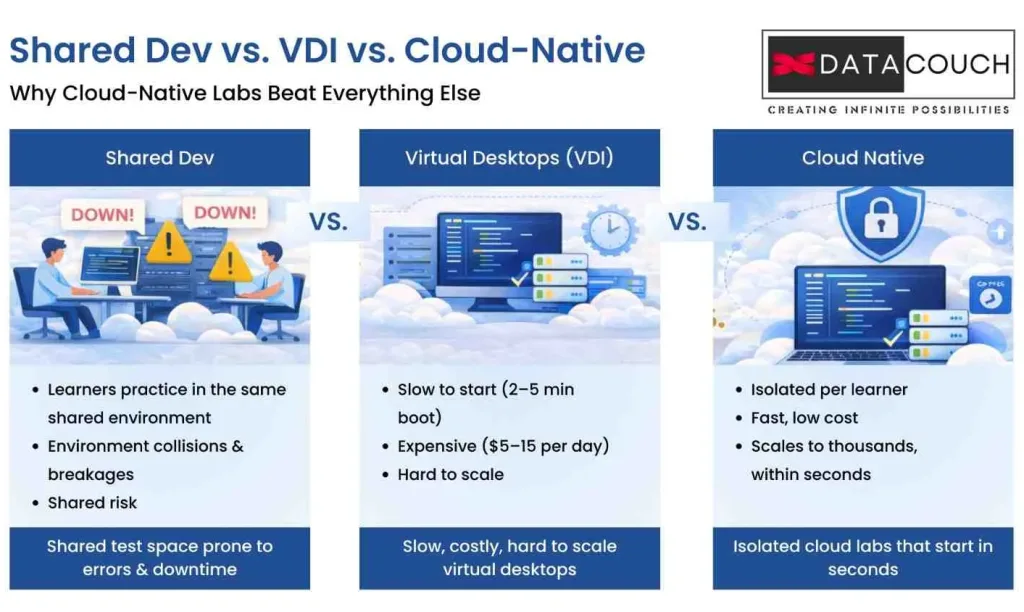
Virtual desktops (VDI) are expensive and slow. Many companies tried moving from physical labs to Virtual Desktop Infrastructure. The problem: VDI spins up in 2-5 minutes, costs $5-15 per user per day, and requires complex infrastructure to scale beyond 100 concurrent users. If you have 500 trainees spread across three continents, your infrastructure bill grows fast.
Browser-based access was not trusted until recently. Older platforms required learners to install software, connect to VPNs, or use clunky remote desktop clients. This added friction to the learning experience and created IT support headaches.
Training data is messy. You cannot just copy your production database and strip out the names. Your database structure itself is intellectual property. An engineer who sees your exact schema, your field naming patterns, and your data relationships has seen inside your company’s brain.
This is where cloud-native virtual labs solve the problem. They do something smarter than just saying “sandbox.”
What "Zero IP Risk" Really Means in a GCC
Here is the critical insight that most training platforms do not explain: IP risk is not just source code.
IP risk includes:
- Source code (obviously)
- System configurations (database credentials, API endpoints, service names)
- Architecture patterns (how your services talk to each other, your naming conventions)
- Environment variables (tokens, secrets, API keys)
- Data structure shapes (your database schema, field names, data types)
- Internal runbooks (how to deploy, how to debug, internal processes)
- Naming conventions (how your company names things reveals how your company thinks)
But there is more. IP theft does not just happen through intentional copying. It happens through:
- Screen recording (A learner records a training session and shares it with a competitor)
- Browser storage data (localStorage and sessionStorage can be accessed via console)
- Clipboard data (Copy-pasting code from the lab into a personal GitHub account)
- File downloads (Learners download lab files and take them home)
- Screenshots (Even one screenshot of a system diagram leaks architecture)
A true “zero IP risk” training lab does something radical. It does not just prevent access to production. It prevents the learner from ever having access to sensitive information in the first place. It uses synthetic data: artificially generated information that has the same shape as real data but contains no actual secrets.
Example: Instead of using real customer records (which are sensitive), the lab generates fake customer records with the same database schema. The learner can write SQL queries, make mistakes, delete data, and learn but they never see actual customer information.
This is the difference between saying “our lab is safe” and actually building zero IP risk into the training experience.
Why Cloud-Native Labs Beat Everything Else
Cloud-native virtual labs are different from three older approaches: shared dev environments, VDI (virtual desktops), and locally installed software.
Shared Dev Environments vs. Cloud-Native Labs
In a shared dev environment, multiple learners practice in the same space. This is cheap to set up, but it falls apart fast.
One learner deletes the test data. Another changes a configuration. Someone commits bad code. Now the training environment is broken and nobody can learn until ops fixes it.
A cloud-native lab gives each learner their own isolated environment. When they break something, only their session fails. The next learner gets a fresh, clean copy. No crosstalk. No surprises.
VDI vs. Cloud-Native Labs
Virtual Desktop Infrastructure works. You get a full desktop delivered through a browser.
But VDI has three problems:
- Slow to start (Booting a full operating system takes 2-5 minutes)
- Expensive to run (Each concurrent session costs real money: $5-15 per user per day in enterprise clouds)
- Hard to scale (Managing 1,000 concurrent users across VDI requires serious infrastructure investment)
A cloud-native lab starts in 5-10 seconds (if it is container-based) or 30-60 seconds (if it is VM-based). It costs a fraction of VDI because you only spin up the services the learner needs. And scaling from 100 to 10,000 learners becomes a software problem, not an infrastructure problem.
Locally Installed Software vs. Cloud-Native Labs
Some companies still ask learners to install software locally. This creates obvious problems:
- IT support nightmare (every machine is different)
- Learner cannot access labs from a cafe, hotel, or home office reliably
- Upgrading everyone to a new version is painful
- No audit trail of what the learner did
A cloud-native lab is browser-based. You log in from anywhere. The training platform owns the environment, so it controls the version and the setup. Auditing is built in.
Want to know more about virtual labs?
Click here to explore DataCouch's virtual lab solution and discover how cloud-native labs transform enterprise training:
The Architecture That Keeps Your IP Safe
Here is what a truly secure cloud-native lab looks like. Most competitors do not explain this level of detail. But architects need to understand the actual pattern.
Isolation: Per-Learner Separated Accounts
The first decision is simple: does each learner get their own isolated account, or do multiple learners share a single environment?
The answer should be clear: each learner gets their own account and their own environment.
Here is why:
- If learner A breaks something, learner B is unaffected (No waiting for ops to fix shared infrastructure)
- Audit trails are per-learner (You can see exactly what each person did and when)
- Credentials are unique (Each learner gets unique database usernames and API tokens that expire when the lab session ends)
Some vendors say “we use multitenancy for cost efficiency.” Multitenancy means many learners share one database but with different access levels. This is cheaper for the vendor but riskier for you. It only takes one security misconfiguration for learner A to see learner B’s data.
Network Isolation: Deny by Default
Inside each learner’s environment, the network should follow a simple rule: deny everything by default, allow only what you explicitly need.
This means:
- Learner cannot reach the internet (unless the training specifically requires it)
- Learner cannot reach other learners’ environments (Network boundary is locked down)
- Learner cannot reach your company’s real infrastructure (No VPN connection, no backdoor access)
- External traffic reaching the learner is blocked (Inbound attacks cannot penetrate)
This is called “deny by default” or “zero trust” networking. It is more restrictive than traditional firewalls, but for training it is the right approach.
Which Technology: Containers vs. Virtual Machines?
Training platforms often ask: should we use containers (like Docker) or virtual machines (like AWS EC2)?
Here is the practical breakdown:
| Factor | Containers | Virtual Machines |
|---|---|---|
| Start time | 5-10 seconds | 30-60 seconds |
| Isolation strength | Process-level (OS kernel shared) | Operating system-level (separate OS) |
| Cost per instance | $0.10-0.50 per hour | $0.50-2.00 per hour |
| Use case | Application-level labs (code, databases) | System-level labs (OS hardening, Linux administration) |
| Density | Run 100+ per host | Run 5-10 per host |
For most GCC training (coding, APIs, databases), containers are the right choice. They start fast, cost less, and let you train more people in parallel.
For system administration training (firewall rules, OS configuration), you may need VMs.
The key is: you should not need every person to have a full desktop. If your training only needs a code editor and a database connection, containers give you that for 10% of the cost.
The Hidden Security Gap That Competitors Do Not Talk About
Here is what most training platforms skip: egress controls.
Egress means “outbound.” How do you stop a learner from copying code out of the lab?
Most platforms say “secure environment” and leave it at that. Here is what actually needs to happen:
Copy-Paste Restrictions
If your lab shows real code architecture or sensitive database structure, learners should not be able to select and copy it.
Your browser can disable right-click menus and keyboard shortcuts. You can intercept copy and paste operations and log them. You can allow copy in some areas (non-sensitive instructions) and block it in others (actual company code).
File Download Controls
If a learner should be able to download their own work but not your company’s templates, the platform should enforce this at the browser level.
This is not paranoid. It is practical. It prevents an engineer from downloading the “golden image” (your reference architecture) and taking it to a new job.
Browser Storage Isolation
Every web application stores data in browser memory: localStorage, sessionStorage, cookies, and cache.
A true zero-risk lab clears this data when the session ends. The learner gets a fresh browser environment each time they log in. No leftover credentials. No persistent state that could leak across sessions.
Artifact Scanning
If the lab allows uploads (for example, learners upload their own code for review), the platform should scan uploads for hardcoded credentials, API keys, and passwords.
If learners download anything, scan it for signs of data exfiltration.
Screen Recording Prevention
Some browsers and operating systems allow disabling screenshot and screen recording. If your training contains extremely sensitive material (rare, but it happens), the platform should prevent learners from using screen capture.
Mirroring Your Enterprise Stack Without Exposing Your IP
Here is the paradox many GCC leaders face: learners need realistic, enterprise-grade practice. But they cannot access the real systems.
The solution is to mirror the architecture without mirroring the actual intellectual property.
Synthetic Data: Fake but Realistic
Instead of using real customer data, generate fake data with the same structure.
Example: Your production database has a customers table with fields like customer_id, name, email, billing_address, phone, purchase_history, and credit_card_token.
A synthetic copy would have:
- The same table structure (same field names, same data types)
- Generated fake customer records (real-looking names, addresses, emails but completely synthetic)
- No actual customer information
The learner can write SQL queries, practice database performance tuning, and debug complex queries. The experience is authentic. The risk is zero.
Reference Architectures, Not Internal Repos
Instead of sharing your internal GitHub repositories, publish “reference architecture” repositories.
A reference architecture:
- Shows the pattern your company uses (microservices, event-driven, monolithic, etc.)
- Uses public examples (like an e-commerce store, a blog platform, a payment system)
- Includes the libraries and frameworks your company actually uses
- Does not contain your proprietary algorithms, business logic, or trade secrets
A developer who studies this reference architecture understands how to build like your company without actually seeing your company’s code.
Golden Images with Approved Overlays
A “golden image” is a pre-built environment template. Instead of building each lab from scratch, you start with the golden image and customize it.
The pattern:
- Base image (Open-source or approved public libraries: PostgreSQL, Node.js, React, Kubernetes)
- Company overlay (Your policies, your configurations, your approved libraries: the ones your company certifies as safe)
- Lab customization (The specific setup for this training: test data, sample code, sample APIs)
The golden image approach scales training to thousands of learners without rework.
Data Residency and Compliance for Global Cohorts
Here is a problem that most training blogs ignore: where does the training data actually live?
If your company is US-based but training a team in the United Kingdom, where is the lab infrastructure running? Where is the learner activity log stored?
This matters because of laws.
The Region Question
Where the labs run (the actual compute):
- Should be close to the learners (latency matters; a lab that takes 5 seconds to respond per keystroke is frustrating)
- Should comply with data residency laws (some countries require data to stay local)
- Should consider cost (US compute is often cheaper than UK compute)
Where the data is stored (activity logs, results, learner submissions):
- Must comply with GDPR if learners are in the European Union
- Must comply with Dubai and UAE data rules if learners are in the Middle East
- Should be auditable (you need to show regulators the logs if asked)
Example: Multinational Training
Imagine your company is based in New York. You are training people in London and Dubai.
- Labs might run in London (closest to learners, faster response)
- Activity logs might be stored in Dublin (EU-compliant S3-equivalent)
- Your company reports might be generated in New York
But you need explicit data processing agreements (DPAs) with your vendor. The vendor must agree to be your “data processor” and follow your rules, not their own.
What to Ask Your Training Vendor
When evaluating a training platform, ask:
- Where do the labs physically run? (Can you choose the region?)
- Where is training data stored? (Can you configure the storage location?)
- Do you have data processing agreements? (Can your company be the data owner?)
- What audit logs are available? (Can you prove who accessed what, when?)
- How long do you keep logs? (Do you delete them automatically or let you control retention?)
Most vendors have vague answers. If they cannot explain data residency clearly, escalate to your legal team before signing.
Scaling From 10 Labs to 10,000 Labs Without Chaos
One of the biggest myths about cloud training is “it scales automatically.”
True, cloud infrastructure scales. But training at scale requires thought.
Burst Capacity and Quotas
If you have 500 trainees and they all start labs at the same time (say, 9 AM in London), your training platform needs to provision 500 fresh lab instances in the next 60 seconds.
This is called “burst capacity.” If your vendor cannot handle it, labs will queue and start 15 minutes late. Learners get frustrated.
How to manage this:
- Set quotas per user (Each learner can run max 1 lab at a time)
- Limit by cohort (Each training cohort gets a resource budget: for example, max 100 concurrent labs)
- Auto-scale aggressively (The platform should scale up 30 seconds ahead of demand, not after)
Concurrency Planning
Concurrency means “how many labs are running at the same time.”
Simple math:
- 500 learners in a 4-week program
- 4 hours per day of hands-on practice
- 250 people online at any given moment
- Each lab needs about 2 CPU cores and 4 GB RAM
- Total: 500 cores, 1 TB RAM running in parallel
This is not huge, but it is not trivial. If your vendor says “we can scale to 10,000,” ask how many they have actually run in production.
Session Pooling and Warm Starts
To speed up lab startup, cloud-native platforms pre-create “warm” lab instances and keep them ready.
Instead of creating a fresh lab for each learner (60-second startup), the platform reuses a warm lab (5-second startup).
This is called “session pooling.” It costs a little extra but dramatically improves user experience.
Global Support Model
If your GCC is distributed across time zones, you need support to follow the sun.
A learner in London cannot wait until 9 AM US time if they are stuck at 5 PM London time. Make sure your training platform has support available during all working hours across your regions.
Cost Governance: The Silent Budget Leak
Here is something no training blog talks about: cost governance.
Virtual labs are inexpensive per user, but they add up fast. Without controls, your monthly training bill can surprise you.
The Cost Breakdown
A typical enterprise cloud lab costs:
- Compute: $0.50-2.00 per lab instance per hour (depending on instance size and cloud provider)
- Storage: $0.05-0.10 per GB per month (for persistent training data)
- Data transfer: $0.10-0.15 per GB transferred out (significant if learners download large files)
- Management overhead: Platform licensing, 5-10% on top of compute
Quick math for 500 learners:
- 500 learners x 4 hours per day x 20 training days = 40,000 lab-hours
- 40,000 lab-hours x $1.00 per hour average = 40,000 dollars for the training program
But without controls:
- Labs left running after sessions end = $5,000 extra
- Oversized instances (100 GB VMs instead of 20 GB) = $3,000 extra
- Unnecessary data transfer = $2,000 extra
- Total = 50,000 dollars (25% waste)
Cost Governance Controls
Auto-shutdown policies: Labs should automatically terminate 15 minutes after a learner logs out. No lingering costs.
Resource quotas: Cap max instance size, max storage per learner, max data transfer per day.
Chargeback by department: If Finance is paying for training, show them cost per learner, cost per training hour, cost per skill.
Showback reports: Give training managers a simple dashboard: “You trained 500 people for $40,000. That is $80 per person, or $10 per training hour.”
Governance and Auditability: Training as a Governed System
Most companies see training as an event. You run a course, people get certified, and you move on.
But your auditors and compliance teams see it differently. They want proof.
Verifiable Training Records
When a regulator asks “Did your team complete security training?” you need to prove it. Not just “yes,” but:
- Who completed training
- What training they completed
- When they completed it
- What region they trained in
- Whether they passed
- An immutable record they cannot alter
Most training platforms provide completion certificates. But enterprises need audit-ready evidence.
This means:
- Immutable logs (Once a training record is created, it cannot be changed)
- Timestamp proof (Each action is timestamped and signed)
- Evidence packs (A downloadable package with all proof of training)
- Compliance audit ready (Formatted for auditors, regulators, and attorneys)
Skills Governance Across Geographies
If you train people in London, India, and Dubai, how do you ensure they learned the same thing?
Governance means:
- Standardized assessments (All regions use the same lab challenges and scoring)
- Consistent passing criteria (A score of 80% means the same everywhere)
- Skill registry (Centralized record of “who knows what, as of when”)
This sounds obvious, but many GCCs miss it. A developer trained in Mumbai might not meet the same standard as a developer trained in London. Governance closes this gap.
Measuring Outcomes That Matter to GCC Leadership
Most training metrics are useless. “Completion rate: 95%” tells you nothing.
What GCC leaders actually care about:
Time-to-Productivity
How long does a new hire take to be productive?
Traditional training: 8-10 weeks before they can ship code without senior oversight
With virtual labs: 2-3 weeks before they can ship code
That is a 5-7 week acceleration. At a 100,000 dollar annual salary, that is 10,000 dollars value per hire.
If you train 50 people, that is 500,000 dollars in productivity gains.
Skills Verification
Did they actually learn? Scored labs provide proof:
- Learner completes a challenge to create a microservice
- Lab automatically grades the submission: Does it compile? Does it pass unit tests? Does it respond to API calls correctly?
- Score: 92% (automatic, objective, reproducible)
This is better than a certificate. It is proof of capability.
Role-Based Competency Benchmarks
Some skills matter more than others. Define:
- Must-have (Every engineer must know this: your company’s code standards)
- Role-specific (Frontend devs need React; backend devs need databases)
- Nice-to-have (Bonus skills for career growth)
Track learners against these benchmarks. Identify gaps. Offer targeted follow-up training.
A Practical Checklist: Your Zero IP Risk Lab Readiness Scorecard
Before you pick a training platform, audit your needs. This checklist groups requirements by category.
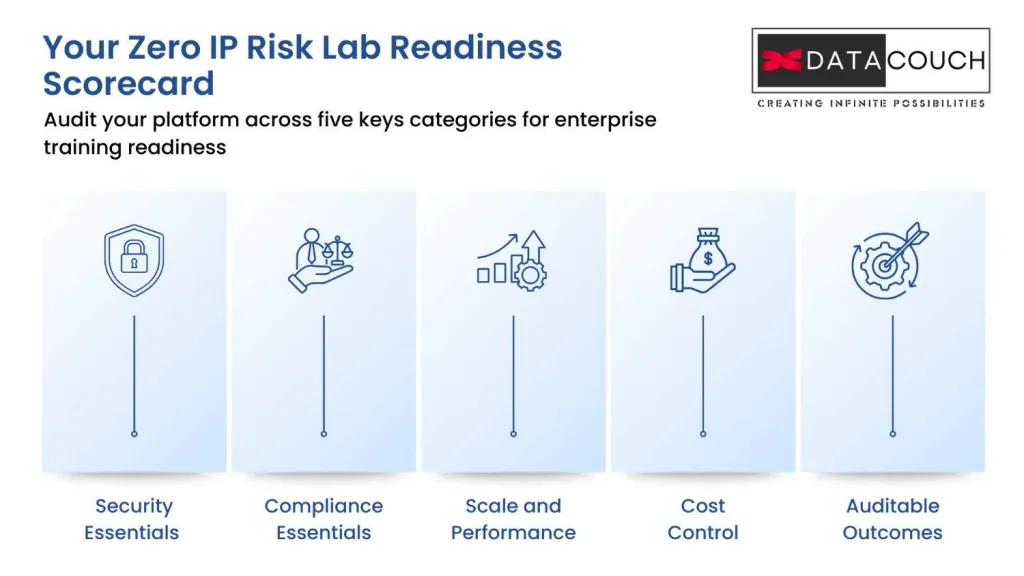
Security Essentials (Foundation)
- Each learner gets isolated account (not shared with others)
- Network isolation (learner cannot reach other learners or production systems)
- Synthetic data (labs use fake data, not real customer or business data)
- Egress controls (copy and paste and file downloads can be blocked)
- Session auto-cleanup (labs shut down 15 minutes after learner logs out)
- Audit logging (every action is recorded with timestamp)
Compliance Essentials (Foundation)
- Data residency (labs can run in regions you specify: US, UK, EU, UAE, etc.)
- GDPR compliance (if training learners in EU, GDPR requirements met)
- Data processing agreements (vendor acts as your data processor, not owner)
- Certifications (vendor has SOC 2, ISO 27001, or equivalent)
- Immutable logs (training records cannot be altered after creation)
Scale and Performance (Intermediate)
- Lab startup under 60 seconds (or under 10 if container-based)
- Concurrent capacity (platform can handle your peak simultaneous users)
- Warm starts (pre-built lab instances for faster startup)
- Global regions (labs available in multiple geographic regions)
- Auto-scaling (labs scale up and down based on demand)
Cost Governance (Intermediate)
- Auto-shutdown enforcement (no lingering costs after session)
- Cost visibility (dashboard showing cost per learner, cost per lab hour)
- Budget alerts (notify when spending exceeds threshold)
- Resource quotas (limit instance size, storage, data transfer per learner)
- Chargeback by department (assign costs to Finance, HR, Engineering, etc.)
Outcomes and Auditability (Advanced)
- Scored labs (automatic assessment of learner submissions)
- Verifiable records (evidence packs ready for auditors)
- Skill competency matrix (track role-based skill acquisition)
- Time-to-productivity reporting (measure productivity acceleration vs. traditional training)
- Compliance audit reports (formatted for regulators and legal teams)
Closing: The Bridge Between Learning and Delivery
The challenge Sarah faced at the beginning is not unique.
Every global company that trains talent offshore faces the same tension: you need realism and speed, but you cannot afford to expose your intellectual property.
The solution is not to choose between training and security. The solution is to demand both.
Cloud-native virtual labs, built with genuine zero IP risk, allow you to train teams faster than ever before while protecting everything that matters to your company.
You can train 50 people in two weeks instead of three months. You can audit every keystroke they made. You can prove to regulators that your training met compliance standards. And you can sleep well knowing that your source code, your architecture, and your trade secrets stayed exactly where they belong: inside your company.
The new standard for Global Capability Centers is not “we have a training program.” It is “we have evidence that our team is ready.”
The right training platform does not just deliver courses. It delivers proof.
Ready to Transform Your GCC Training?
DataCouch delivers cloud-native virtual labs built specifically for enterprise training at scale. Our platform provides enterprise-isolated lab environments, zero-installation browser-based access, and verifiable training records for compliance audits. All designed for companies training teams across US, UK, UAE, and India regions.
The labs automatically shut down to prevent cost overruns. Activity logs track every action for audit readiness. And because everything runs in the cloud, you scale from 10 learners to 10,000 without changing your infrastructure.
Are you ready to close the gap between hiring and productivity? The right training platform can cut your time-to-productivity in half while cutting costs by 30%. That changes the economics of your entire GCC program.